
The short answer: Lightroom wins for high-volume batch workflows and cross-device editing. Capture One wins for color precision and studio/tethered shooting. If you're on a budget, Luminar Neo ($99–$179 one-time) is the strongest paid alternative — and Darktable is the best free RAW processor if you don't need the latest camera profiles.
That said, picking the wrong tool costs you real money and real time. This guide breaks down exactly what each option does well, where each falls short, and which type of photographer should choose which — based on aggregated expert and user feedback, not marketing copy.
How this guide was researched: This comparison synthesizes manufacturer specifications, independent reviews from PCMag, Amateur Photographer, and The Frames, and verified user feedback. It does not reflect hands-on testing by Trusted Buyer Report. We may earn a commission if you purchase through links on this page — our recommendations are finalized before any affiliate link is applied.
The 2026 Comparison at a Glance
| Software | Best For | 2026 Pricing | Standout 2026 Feature | AI Tools | Platforms |
|---|---|---|---|---|---|
| Adobe Lightroom | Batch editing, multi-device workflows | $10.99–$19.99/mo | Firefly Gen-AI Erase | Masking, subject select, AI Denoise, sky detection | Desktop, Mobile, Web |
| Capture One | Studio, tethered shooting, color grading | ~$18/mo or ~$299 perpetual | AI "Match Look" styling | Match Look, AI masking | macOS, Windows, iOS, iPadOS |
| Luminar Neo | Enthusiasts, content creators | $99–$179 perpetual (one-time) | AI Light Depth & AI Assistant | Object removal, sky replacement, Relight, Light Depth | macOS, Windows, iOS, Android, ChromeOS |
| Affinity Photo 2 | Budget-conscious intermediate users | $69.99 one-time | Live filters, layer-based RAW editing | Limited | Windows, Mac, iPad |
| GIMP | Free pixel-level editing | Free | Plugin-based only | Plugin-based (not native) | Desktop only |
| RawTherapee | Free open-source RAW processing | Free | Advanced wavelet processing | None native | Windows, Mac, Linux |
| Darktable | Free Lightroom-like DAM + RAW editing | Free | Non-destructive workflow, dark table | None native | Windows, Mac, Linux |
| Photomator | Apple ecosystem users | ~$29.99/yr | Deep Apple Photos sync | Yes | Mac, iOS only |
Lightroom pricing reflects the base Photography Plan (20GB). As of March 2026, Adobe raised the 1TB Lightroom plan to $14.99/mo (annual) and $22.49/mo (month-to-month). Capture One raised prices 6% across all products in June 2026. Luminar Neo perpetual desktop license starts at $99. Always verify current pricing directly on each vendor's site.
Why This Decision Matters More in 2026
Three things have genuinely shifted the landscape since 2024 — and they're not just marketing trends.
Subscription fatigue has hit a tipping point. Photographers who have been paying Lightroom's monthly fee for years are doing the math. Adobe raised the 1TB Lightroom plan to $14.99/month in March 2026, and Capture One followed with a 6% price increase across all tiers in June. Meanwhile, perpetual-license tools like Luminar Neo and Affinity Photo 2 have closed the feature gap enough that the calculation is no longer obvious. For context on how subscription stacking across multiple creative tools affects annual spend, our Software & Apps Buyer's Guide 2026 covers VPNs, security tools, and productivity software through the same lens.
AI tools are no longer a premium differentiator. Background removal, sky replacement, and object-aware masking now appear across free and mid-tier paid tools. The real question in 2026 is how well AI integrates into a professional RAW workflow at scale — not whether a tool has AI at all.
New camera bodies are shipping faster than free tools can keep up. According to Imagen AI, free tools like Darktable and RawTherapee face a 3–6 month lag before supporting the RAW formats from new camera models — because profiles are reverse-engineered rather than developed with manufacturer cooperation. If you just bought a new Sony or Canon mirrorless body, that lag is a practical obstacle, not a theoretical one.
There's also a switching-cost reality that pricing comparisons rarely capture: years of catalogs, custom presets, and plugin libraries represent real friction. Capture One 20's interface overhaul was explicitly designed to reduce that friction for photographers coming from Lightroom — a clear sign that Phase One understands the barrier.
Adobe Lightroom in 2026: What It Does Best (and Where It Falls Short)
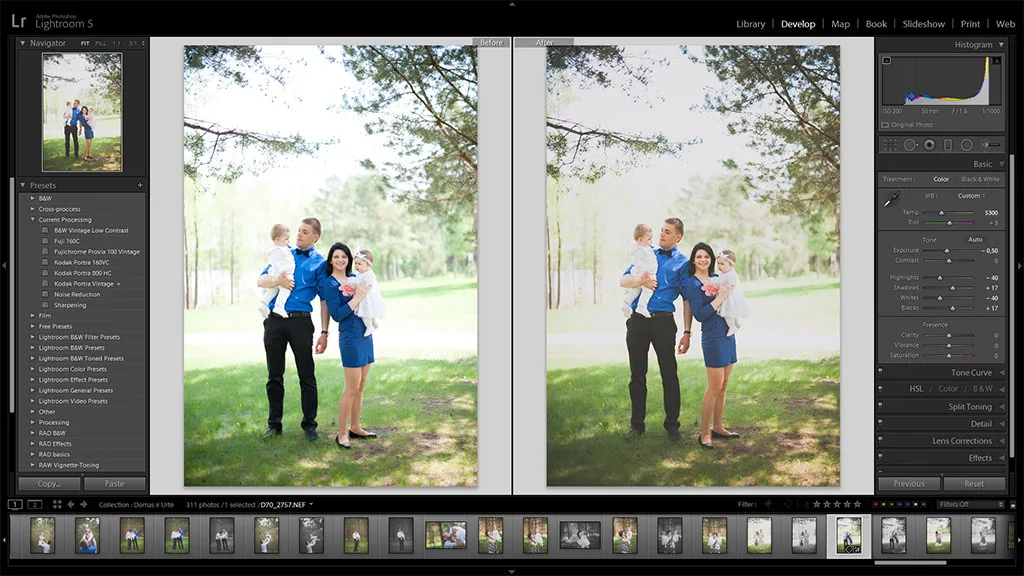
Lightroom's Library module is still the industry benchmark for organizing large photo archives. No competing tool in this comparison matches its combination of cataloging depth, smart collections, metadata management, and cross-device sync. For photographers managing thousands of images across multiple shoots and devices, that infrastructure has measurable value.
The 2026 AI toolkit is the most comprehensive in the mainstream market. Lightroom's masking system handles complex masks with relative ease — subject selection, sky detection, and background isolation all work reliably. AI Denoise and AI Super Resolution handle low-light and underexposed files in ways that don't require round-tripping to Photoshop. The headline 2026 addition is Firefly Gen-AI Erase: generative AI for object removal built directly into the editing workflow, without leaving Lightroom. For photographers who occasionally need to remove a distracting element from a frame, this removes a significant step.
Lightroom also holds a clear advantage in camera and lens profile coverage — its database covers more models than Capture One, including older and less common bodies, and its third-party plugin ecosystem is substantially larger. A notable example: Excire Search 2026, a Lightroom plugin that provides AI-powered image search across archives of tens of thousands of images, available as a one-time purchase.
Where Lightroom falls short: There is no perpetual license. You pay monthly indefinitely, or you lose access to your editing workflow entirely. For photographers who resent that model on principle, no amount of feature improvement changes the economics. Advanced color grading also lags behind Capture One — if precise skin tone rendering across a controlled studio shoot is your primary concern, Lightroom's color tools are capable but not best-in-class. And if you're comparing total cost, Adobe's 1TB plan now runs $14.99/month ($179.88/year), which adds up quickly against one-time perpetual alternatives.
Choose Lightroom if: You shoot high-volume events (weddings, sports, news), need reliable cross-device editing across desktop/mobile/web, or depend on the broader Adobe ecosystem and third-party Lightroom plugins.
Capture One in 2026: The Professional's Choice Explained
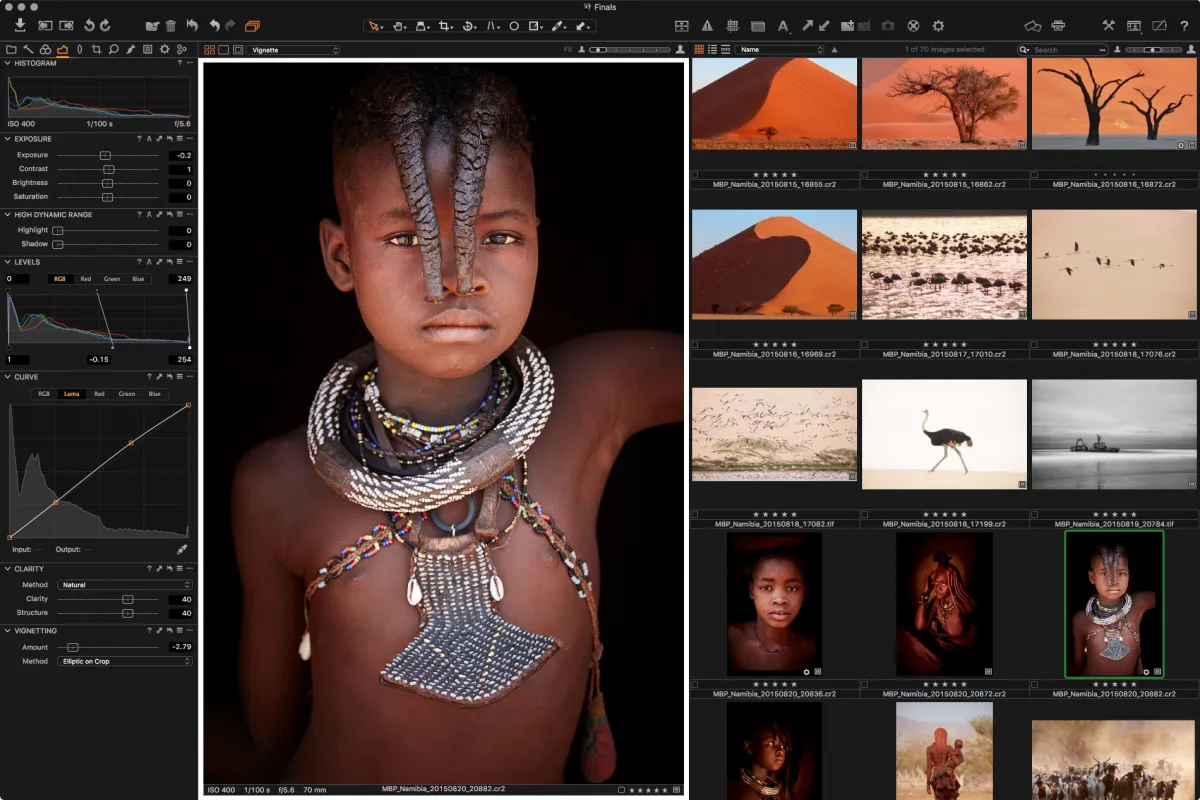
Capture One's reputation for color accuracy reflects a real technical difference in how the software processes RAW files. The color grading engine is widely regarded as superior for skin tones and controlled studio environments — which explains why it dominates among commercial and fashion photographers who cannot afford color inconsistency across a client deliverable.
Tethered shooting is the capability that most clearly separates Capture One from the field. If controlling your camera directly from the software during a live shoot is part of your workflow, Capture One should be on your shortlist. The tethering tools are more robust and reliable than most competitors, including Lightroom Classic. Combined with adjustment layers and masking tools that rival Photoshop's functionality natively — without needing a separate application — the software reduces round-tripping for most professional workflows.
The Sessions workflow is a genuinely useful structural feature: Sessions are standalone projects containing only the current shoot, keeping the interface clean and focused. Once complete, you can import a Session into your main Capture One catalog for archiving. This suits photographers who want a distraction-free environment during active editing but still need centralized archive management.
Capture One's 2026 headline feature is AI "Match Look" styling — AI analysis that applies a consistent visual style across an entire shoot. This is a different type of AI tool from Lightroom's corrective automation: it's about stylistic consistency at scale, which matters in commercial and editorial contexts.
The pricing reality as of July 2026: Following the June 2026 price increase, Capture One Pro runs approximately $18/month (annual) or $28/month (month-to-month). The perpetual license sits around $299, though major version upgrades — which subscription holders receive automatically — require separate purchase. Over a three-year horizon, the subscription often works out comparably or cheaper than perpetual + upgrade costs.
Where Capture One falls short: The plugin ecosystem is significantly smaller than Lightroom's. Mobile workflow support exists on iOS and iPadOS but isn't as seamless as Lightroom's cross-device sync. If you work primarily on the go or depend heavily on third-party integrations, those gaps are real.
Choose Capture One if: You work in controlled studio or commercial environments, shoot tethered regularly, or need best-in-class color grading and skin tone rendering.
How Free Photo Editing Tools Actually Stack Up in 2026
The honest answer: closer than before, but the gap depends entirely on what you need the software to do.
GIMP remains the most feature-rich free option for pixel-level editing — layers, masks, and manual adjustments with genuine depth. What it lacks is a non-destructive RAW workflow and any native AI tools. You can add AI capabilities through plugins, but the integration is not seamless, and GIMP is desktop-only. It belongs in a different category from Lightroom or Capture One for photographers whose primary need is RAW processing at volume.
Darktable and RawTherapee are the strongest free RAW processors available. Together they support over 400 camera formats — but with that critical 3–6 month new-camera lag, and accuracy of color and lens profiles that reflects reverse-engineered rather than manufacturer-supported profiles. For photographers using cameras released more than a year ago, this is a non-issue. For early adopters of new mirrorless bodies, it's a genuine obstacle.
RawTherapee's advanced wavelet processing is a standout technical feature that doesn't appear in many paid tools at any price point — if you need fine-grained control over luminance and color detail in complex images, its engine is genuinely sophisticated. Darktable, meanwhile, offers the closest workflow experience to Lightroom's Library module among free tools, including non-destructive editing and a proper DAM system.
Batch processing is where free tools consistently underperform. For a wedding photographer processing 800 images from a single event, the performance difference between free and paid tools translates directly into hours of additional work. Paid software is architecturally designed for high-volume throughput; free tools are not.
For casual photographers, hobbyists, or anyone on a strict budget who shoots with a camera released more than a year ago and doesn't process large batches: free tools are entirely viable. For professionals whose time has a measurable hourly cost, the workflow overhead of free tools typically exceeds the license savings within the first year.
The Middle Tier: Paid Alternatives Worth Considering
Between Lightroom's subscription and Capture One's perpetual license, there's a tier of paid tools that solve specific problems particularly well.
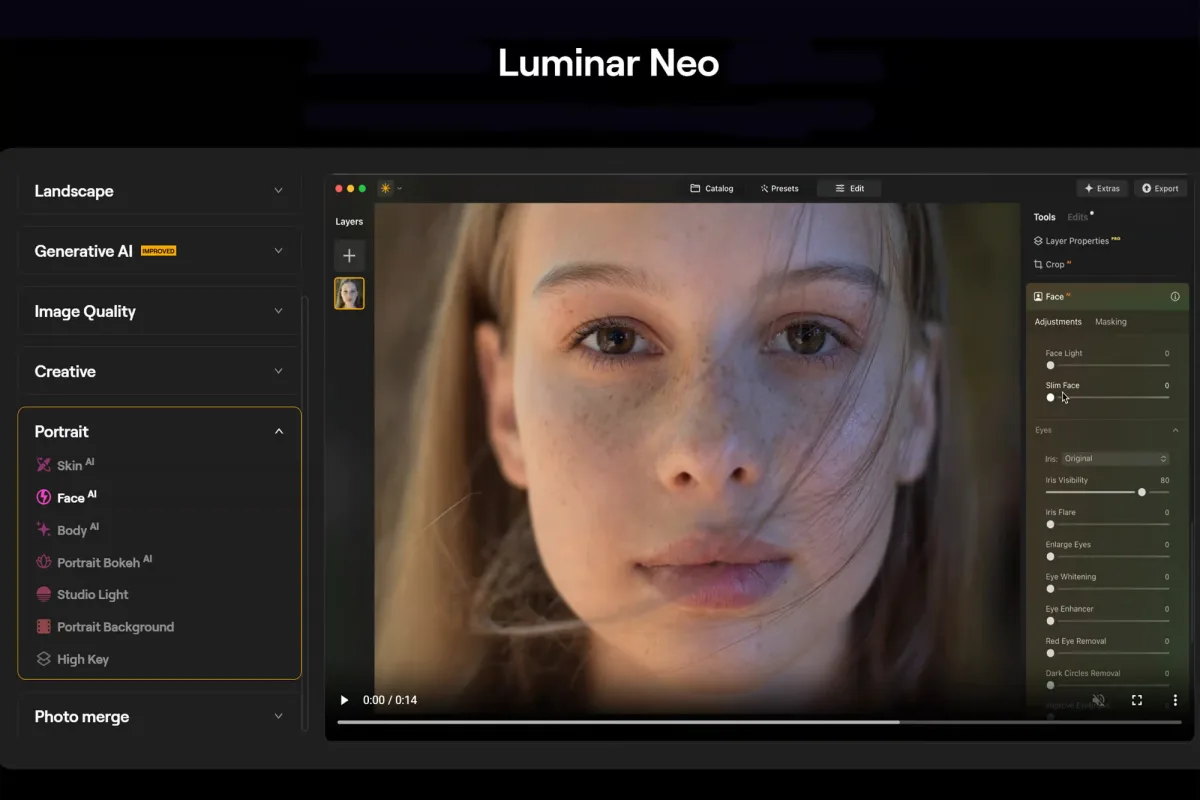
Luminar Neo ($99–$179 perpetual one-time) is the strongest AI-first alternative for enthusiasts and content creators. Its AI feature set goes beyond standard editing: automatic object removal, sky replacement, Relight, AI Assistant, and Light Depth — a depth-based lighting tool with no direct equivalent in Lightroom or Capture One. It runs on macOS, Windows, iOS, Android, and ChromeOS, making it the most cross-platform option in this category. It works as both a standalone app and a Photoshop/Lightroom plugin, which adds flexibility for photographers already in the Adobe ecosystem. The perpetual desktop license starts at $99; the Cross-Device license (desktop + mobile) runs $139; the Max tier (adds Creative Library) is $179.
Affinity Photo 2 ($69.99 one-time) is the best budget option for photographers who need layer-based editing comparable to Photoshop without recurring costs. It offers non-destructive layer-based editing with full blend modes, advanced layer masks, RAW photo processing, and live filters that remain editable after application. Available on Windows, Mac, and iPad. Its limitation: Affinity Photo 2 is an editor, not a DAM — you'll need a separate solution for image organization.
Photomator (~$29.99/year) is the right choice specifically for Apple ecosystem users. Its deep Apple Photos sync keeps your library, albums, and edits consistent across Mac, iPhone, and iPad without manual import/export steps. The catch: Mac and iOS only.
Imagen AI (pay-as-you-go, ~$0.05/image) operates on a completely different model — it's designed for professional photographers with variable workloads. The platform trains on your editing style and applies it automatically across entire catalogs. Best for wedding and event photographers who process thousands of images during peak season but far fewer during quieter periods. This is also relevant if you're already using Lightroom: Imagen AI integrates directly and can reduce post-production time substantially for high-volume shooters.
RAW Processing, AI Tools, and Batch Editing: Where Each Tool Actually Stands
These three capabilities determine real-world workflow quality more than any other factor.
RAW Processing
Lightroom and Capture One both work with camera manufacturers to develop color and lens profiles, which means accurate RAW rendering from the day a new camera ships. Capture One's color science is widely regarded as superior for controlled lighting and skin tones. Lightroom's profile database is broader, covering more camera models including older and less common bodies. Free tools reverse-engineer profiles, introducing both an accuracy gap and the 3–6 month new-camera lag.
AI Tools
Lightroom's 2026 AI suite is the most comprehensive in the mainstream market: masking, subject selection, sky detection, AI Denoise, AI Super Resolution, and Firefly Gen-AI Erase. Capture One's AI Match Look is a different tool — less about corrective automation, more about stylistic consistency across a shoot. Luminar Neo's AI features (object removal, sky replacement, Relight, Light Depth) are the most visually creative and suit photographers who want transformative effects rather than technical corrections. Free tools offer no native AI; GIMP can access AI features through plugins but the workflow is fragmented.
Batch Editing
Lightroom's Library module is purpose-built for high-volume batch processing — applying settings, presets, and AI adjustments across thousands of images simultaneously. Imagen AI extends this with fully automated AI-driven editing across entire catalogs. Capture One handles batch processing competently but its architecture prioritizes per-image quality over volume throughput. Free tools struggle with large collections of high-resolution files — a practical problem for wedding and event photographers who regularly process hundreds of images per session.
Which Software Is Right for You?
You shoot high-volume events (weddings, sports, news): Lightroom is the right call. Its batch processing, AI tools, and Imagen AI integration are unmatched for throughput. The subscription cost is justified by the time it saves at scale.
You work in a controlled studio environment (commercial, fashion, product): Capture One's color engine, tethering tools, and Sessions workflow justify the cost. The investment pays off on the first client shoot where skin tone consistency matters.
You're an enthusiast or content creator who hates subscriptions: Luminar Neo at $99–$179 one-time is the strongest choice. It won't replace a dedicated DAM system, but for editing quality and AI feature depth at a one-time price, nothing else at this tier comes close.
You need Photoshop-level editing without a Photoshop price: Affinity Photo 2 at $69.99 one-time gives you layers, blend modes, and RAW processing that rivals Adobe's output for occasional complex edits. Not a cataloging tool.
You're an Apple-only photographer on a tight budget: Photomator at ~$29.99/year integrates better with the Apple Photos ecosystem than any competitor, at a price that's genuinely hard to argue with.
You're a hobbyist or student with no budget: Start with Darktable (closest to Lightroom's workflow) or RawTherapee (best technical RAW processing). You'll hit limits if you shoot newer cameras or need batch processing at scale — but for learning and casual shooting, both are excellent.
Frequently Asked Questions
Is Lightroom worth the subscription in 2026? For professional photographers who process large volumes — especially wedding and event shooters — yes. The time savings from batch processing, AI tools, and Imagen AI integration typically outweigh the subscription cost within the first few months. For hobbyists shooting occasionally, the math is harder. Luminar Neo or Darktable are worth evaluating first.
Is Capture One better than Lightroom for color grading? For controlled studio environments and skin tone precision, yes — broadly. Capture One's color engine is technically superior for these use cases. For general photography and cross-device workflows, Lightroom is more capable overall. The right answer depends on your shooting context.
What is the best free photo editing software in 2026? For RAW processing: Darktable (best Lightroom-like workflow) or RawTherapee (best technical depth). For pixel-level editing: GIMP. None of these match paid tools for batch processing speed or new-camera RAW support day-one.
Can Luminar Neo replace Lightroom? For many enthusiasts and content creators, yes — especially if you don't need a full DAM system and prefer AI-driven creative editing. Luminar Neo cannot replace Lightroom for high-volume batch workflows or for photographers deeply integrated into Adobe's ecosystem (Photoshop round-tripping, extensive plugin libraries). It works as a Lightroom plugin if you want to keep both.
What happened to Capture One pricing in 2026? Capture One raised prices by 6% across all products in June 2026. The Pro plan now runs approximately $18/month (annual billing) or $28/month-to-month. The perpetual license sits around $299. If you're considering switching to annual billing to lock in a rate, check the Capture One pricing FAQ for current details.
The Bottom Line
The photo editing software market in 2026 has no single winner — but it does have a right answer for your specific situation. Lightroom leads for volume and ecosystem. Capture One leads for color precision and studio work. Luminar Neo leads for creative AI editing at a one-time price. And free tools are genuinely viable for the right type of shooter.
If you're evaluating software costs across your broader creative toolkit, it's worth reading our Office & Business Buyer's Guide 2026 alongside this guide — subscription stacking across design, writing, and editing tools adds up faster than most photographers realize.
For related comparisons, we've also covered graphic design tools in 2026 (Canva vs Adobe vs Figma) and the best AI writing tools this year — both useful if you're building a broader creative workflow stack. And if video or audio is part of your content production, our best podcast recording and editing tools guide covers that side of the stack in the same format.
Reviewed by the Trusted Buyer Report editorial team. This article was drafted with AI assistance and fact-checked before publishing. We may earn a commission from purchases made through links on this page. Our editorial assessments are completed before affiliate links are applied. Full disclosure →