This guide is based on independent testing data from PCMag, CNET, Wired, Security.org, and verified consumer sources. Trusted Buyer Report has not conducted hands-on testing of the products reviewed here — we analyze and synthesize expert findings so you don't have to read a dozen technical reviews yourself. We may earn a commission if you purchase through our links, at no extra cost to you. Read our full disclosure →
Quick Verdict
If you only read one paragraph: For most individuals and remote workers in 2026, the practical security stack is three layers — a no-logs VPN for network protection, a well-tested antivirus for device protection, and end-to-end encrypted email for communication. Proton VPN leads on independently verified privacy; NordVPN wins on bundled value; Bitdefender consistently tops independent antivirus labs. The full guide below explains what each layer actually does, how to pick between providers, and where people commonly overspend or leave gaps.
TL;DR — Key Takeaways
- A VPN, antivirus, and encrypted email protect three different attack surfaces — none fully substitutes for the others.
- 54% of Americans still don't use a VPN, according to Security.org's 2026 VPN research, even as cyberattack volumes hit record highs.
- The only meaningful verification of a VPN's "no-logs" promise is independent third-party audits — not policy text on a vendor's website.
- For antivirus, brand recognition is a poor proxy for quality. Check AV-TEST or AV-Comparatives results, not marketing pages.
- Business and personal VPN needs diverge the moment you need centralized access management — roughly when a team exceeds five people.
- A complete stack costs under $15/month for most individual users if you avoid overlapping bundle features you already have.
The Gap That Creates Real Risk
Most Americans think they are not a target. They are wrong — and the numbers prove it.
Security.org's 2026 research found that 54% of Americans don't use a VPN, either because they've never heard of one or don't believe they need one. Meanwhile, cybersecurity requests to France's national assistance platform surged 51% in 2024 alone, according to Spliiit's 2026 digital security analysis, driven by phishing, ransomware, account breaches, and banking theft.
The old advice — "use strong passwords and don't click suspicious links" — is genuinely insufficient in 2026. Cyberattacks now target individuals as systematically as corporations, and the tools behind those attacks are cheaper and more accessible to bad actors than ever before.
Here's what makes 2026 different from previous years:
- Remote work has created permanent exposure: Between 30–40% of employers now provide technology stipends for home digital infrastructure, per WorkTime's 2026 remote work data. That means sensitive business data flows through home networks and personal devices that corporate IT teams cannot control.
- Productivity app sprawl multiplies entry points: The more cloud-connected tools a worker uses, the more authentication gaps, data-sharing policies, and unpatched vulnerabilities exist in their stack.
- VPN adoption is accelerating globally, but unevenly. The Asia-Pacific VPN market is growing at 16% annually through 2027 — two points above the global average of 14% — as hundreds of millions of new internet users come online in markets like India with limited digital security infrastructure.
The practical conclusion: building a security stack is no longer optional. The question is whether you do it deliberately or by accident.
Understanding the Three Layers of a 2026 Security Stack
Before comparing products, it helps to understand what problem each layer actually solves — because VPN, antivirus, and encrypted communication protect against different threat vectors, and none of them fully replaces the others.
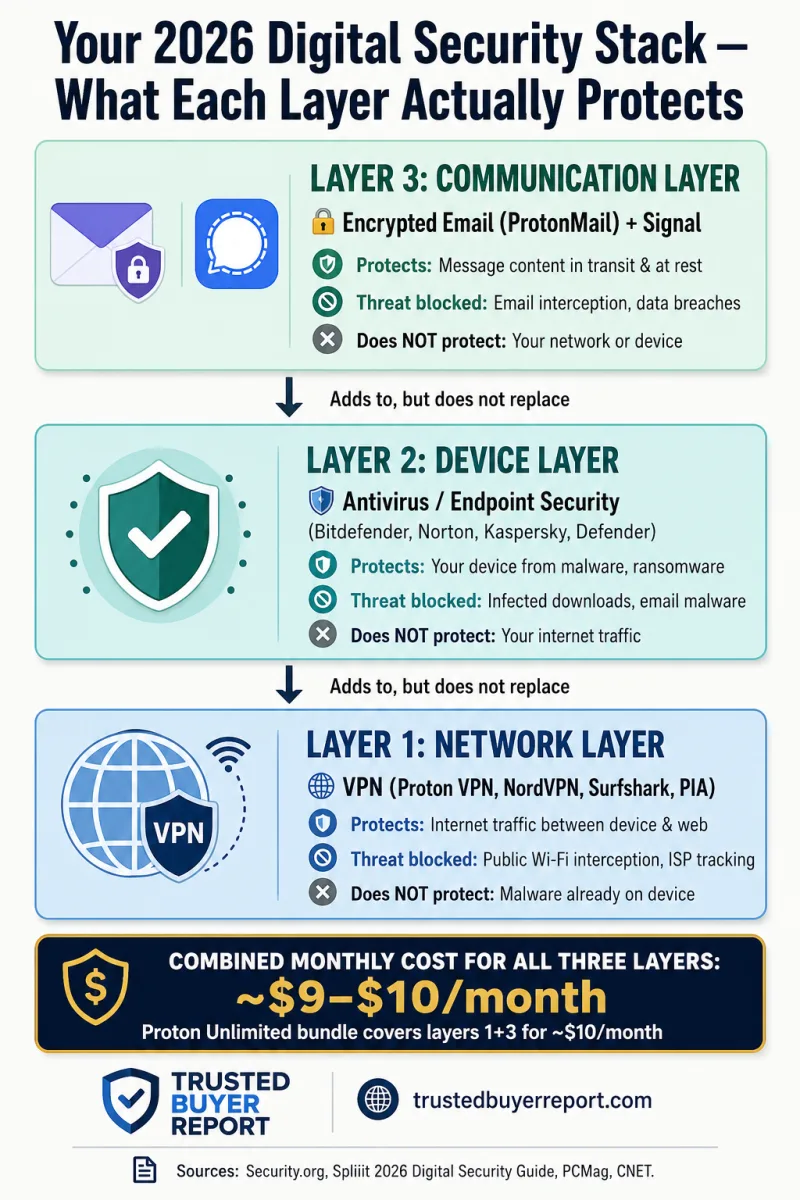
Layer 1 — The Network Layer: VPN
A VPN creates an encrypted tunnel for your internet traffic. As PCMag's 2026 business VPN guide explains, your data is sent to a remote server, encrypted in transit, and appears to originate from that server's location rather than your actual device. This protects data moving between your device and the internet — most valuable on public Wi-Fi, where unencrypted traffic can be intercepted by anyone on the same network.
What a VPN does not do: it cannot stop malware already on your device. It cannot protect you from a phishing attack that tricks you into handing over your credentials. It is a network-layer tool.
Layer 2 — The Device Layer: Antivirus and Endpoint Security
Antivirus software protects against threats that arrive on your device regardless of your network connection — malware from a legitimate-looking download, ransomware in an email attachment, or scripts embedded in documents. As Crozdesk's IT security framework categorizes it, endpoint protection secures the device itself; a VPN secures the tunnel.
Layer 3 — The Communication Layer: Encrypted Email and Messaging
Standard email is transmitted and stored in ways that make content accessible to providers, and potentially to third parties through legal requests or data breaches. End-to-end encrypted email — services like ProtonMail — ensures only the sender and recipient can read the message content, even if the provider's servers are compromised.
The practical budget implication: Spliiit's 2026 security guide estimates comprehensive three-layer coverage costs under €10 per month for an individual — roughly $11 USD — if you avoid double-paying for the same feature across bundles. Understanding the stack architecture helps you avoid the two most common mistakes: paying for a VPN that bundles antivirus features you already have, and underspending on device-level protection because you assume the VPN covers everything.
How to Evaluate a VPN in 2026: What Independent Testing Actually Reveals
Most VPN marketing leads with server counts and connection speeds. Those numbers matter — but they're not the most important criteria. Here's what separates genuine privacy protection from marketing copy.
The No-Logs Audit: The Only Real Trust Signal
A "no-logs" claim on a website is not evidence of anything. The only meaningful verification is a third-party audit of the provider's infrastructure and logging practices.
PCMag's 2026 VPN testing highlights Proton VPN's open-source code, regular independent audits, and active bug bounty program as genuine trust signals — not marketing language, but verifiable practices allowing outside researchers to find and report vulnerabilities.
CNET's VPN testing provides a useful counterexample: despite CyberGhost publishing detailed quarterly transparency reports and operating RAM-only server infrastructure (both genuinely positive), CyberGhost's privacy policy contains data-sharing arrangements CNET describes as "questionable" — and its onboarding flow reinforces what CNET calls a "dangerous falsehood that VPNs can make you totally anonymous online." A provider that misleads users about the fundamental limits of its own product is a red flag regardless of server architecture.
Speed Impact: Knowing the Real Trade-Off
Security.org's testing of 50+ VPN services found Proton VPN's standard servers average 8% download speed loss and 4% upload speed loss — competitive for the category. However, enabling Proton's Secure Core servers (which route traffic through multiple privacy-focused jurisdictions for maximum privacy) significantly increases that speed hit. That's not a flaw; it's a trade-off worth knowing before you subscribe.
Split Tunneling on macOS: Rarer Than You Think
Split tunneling routes only selected apps through the VPN while leaving others on your regular connection — useful for keeping local network access (printers, NAS drives) while protecting your browser. CNET notes that split tunneling on macOS is rare; Private Internet Access (PIA) and Surfshark are among the few providers that include it. If you primarily work on a Mac, verify this feature explicitly before committing.
Jurisdiction Matters More Than the Policy Text
Where a VPN company is legally incorporated determines what government data requests it can be compelled to comply with. Providers based in countries with strong privacy law and outside intelligence-sharing alliances (the "14 Eyes" network) offer structural privacy advantages that no policy document can replicate. This is a legal reality, not paranoia.
VPN Comparison 2026: Honest Breakdown Based on Independent Testing
The following draws on testing from PCMag, CNET, Security.org, and Wired — not vendor-provided specifications.
| Provider | Best For | Starting Price | Key Strength | Key Weakness |
|---|---|---|---|---|
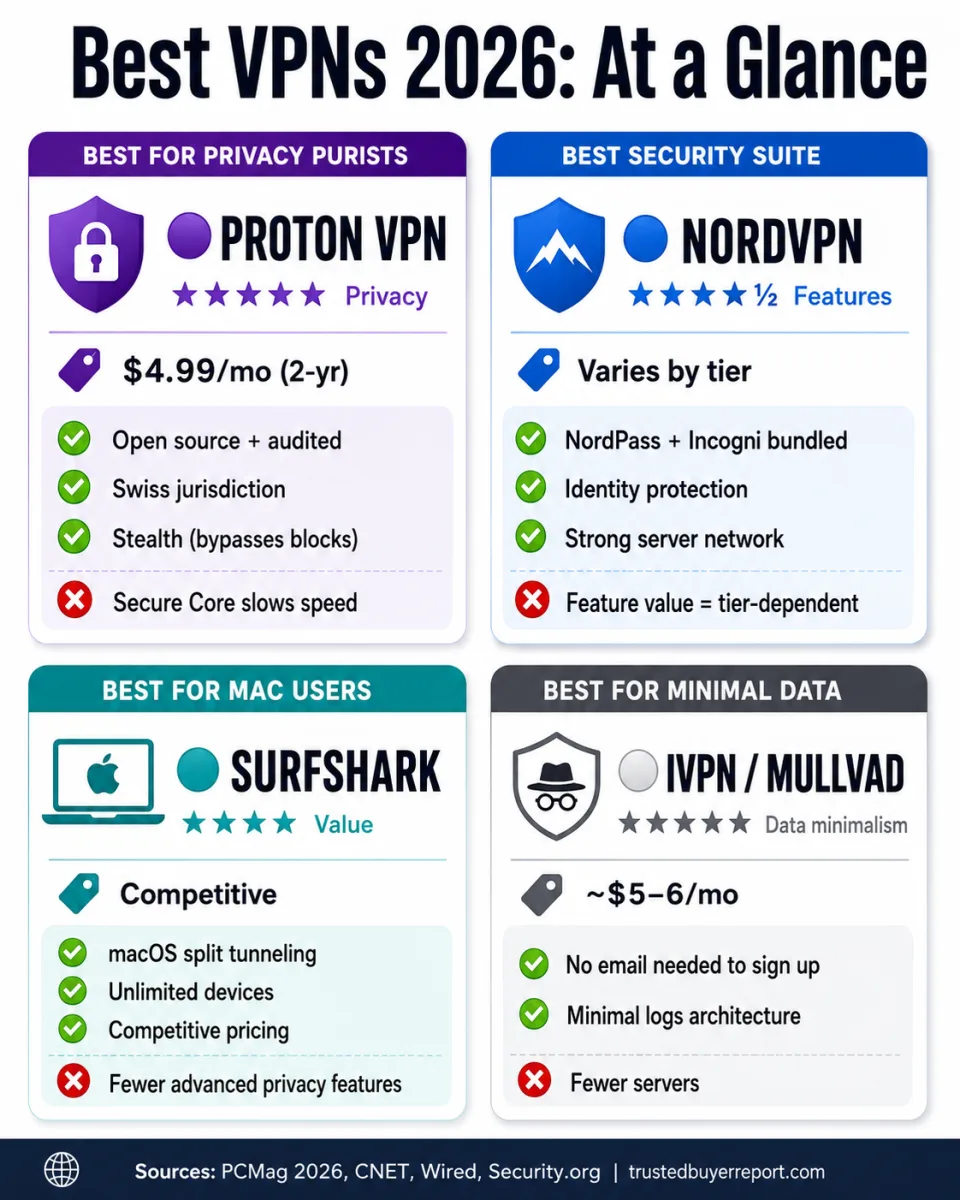
| Proton VPN | Privacy-first, high-risk environments | $4.99/mo (2-yr plan) | Open source, audited, Stealth obfuscation | Secure Core significantly reduces speed |
| NordVPN | Users wanting an integrated suite | Varies by tier | NordPass, NordProtect, Incogni bundled | Value depends heavily on which tier you choose |
| Surfshark | Apple ecosystem users | Competitive | macOS split tunneling, competitive price | Fewer advanced privacy features than Proton |
| PIA | Power users, macOS split tunneling | Competitive | Highly customizable, macOS split tunnel | Less beginner-friendly interface |
| CyberGhost | Users who want transparency reports | Competitive | Quarterly reports, RAM-only servers | Misleading anonymity claims; questionable data-sharing |
| IVPN | Minimal-data privacy purists | $6/mo (Pro, 7 devices) | Minimal data collection, strong ethics | 2-device limit on Standard plan |
| Mullvad | Anonymous, no-account privacy | ~$5/mo flat | No email required to sign up | Fewer servers than Proton/Nord |
On Proton VPN's Stealth feature: PCMag's testing specifically calls out Proton VPN's Stealth protocol, which provides an obfuscation layer designed for users in countries like Iran and Russia where VPN traffic itself is detected and blocked. Most users will never need it — but for anyone traveling to or living in a country with internet restrictions, it's a meaningful differentiator unavailable from most competitors.
On NordVPN's suite model: According to Wired's 2026 VPN analysis, NordVPN's Plus plan adds an ad blocker and NordPass (rated among the better password managers available). Higher tiers layer in NordProtect for identity theft monitoring and Incogni for data broker removal. Proton focuses narrowly on privacy architecture; NordVPN leans into security breadth. Neither is wrong — they serve different priorities.
On IVPN vs. Mullvad: IVPN's Standard plan caps you at two devices — a real constraint for anyone with a phone, laptop, and tablet. The Pro plan raises this to seven devices at $6/month. Mullvad offers five devices at a lower flat rate, per Wired. For users who prioritize minimal data collection above all else, both are worth evaluating — but the device-per-dollar math favors Mullvad for most setups.
Business VPNs vs. Consumer VPNs: When Does the Distinction Actually Matter?
The encrypted tunnel mechanics are identical — your traffic is routed through a remote server and encrypted in transit, as PCMag's business VPN guide explains. What differs is everything around that tunnel.
Business VPNs provide:
- Centralized admin dashboards to manage user accounts, enforce connection policies, and audit access logs
- Instant access revocation when employees leave — a real security gap in consumer tools
- Compliance-grade encryption and data residency controls for regulated industries (HIPAA for healthcare, financial services data protection frameworks, legal privilege requirements)
For solo freelancers or very small teams where centralized management isn't a concern, a well-chosen consumer VPN with strong independent privacy credentials is often sufficient. The threshold where a dedicated business solution becomes necessary is roughly when you need to manage access for multiple people, enforce consistent security policies, or demonstrate compliance to clients or regulators.
Crozdesk's IT security framework distinguishes between VPN (network-level protection), Web Application Firewall (protecting web-facing applications), and endpoint security (protecting devices accessing corporate networks remotely). For businesses, all three categories are relevant — and a VPN alone does not constitute a complete security posture.
Antivirus and Endpoint Security in 2026: How to Evaluate Beyond Brand Recognition
Here's an uncomfortable truth: brand recognition in antivirus software is a poor proxy for quality. Names most people know — McAfee, Norton, Avast — are not necessarily the best performers in independent testing. The only reliable way to evaluate detection rates is through AV-TEST and AV-Comparatives, which run controlled experiments using real malware samples and publish results that vendors cannot influence.
Top Antivirus Options by Independent Lab Performance
Spliiit's 2026 security guide compared Bitdefender, Kaspersky, McAfee, and Avast across detection rates, system performance impact, and feature value:
| Product | AV-TEST Detection | System Impact | Notable Feature | Consideration |
|---|---|---|---|---|
| Bitdefender | Consistently high | Low | Strong detection, light footprint | Best balance for most users |
| Kaspersky | Historically high | Low-medium | Excellent detection track record | Russian origin; government advisories in US/UK/Germany |
| Norton 360 | High | Medium-high | Bundles VPN + dark web monitoring | Can be resource-intensive on older hardware |
| Avast Free | Good | Low-medium | Free tier available | Past privacy controversy (data selling) |
| Malwarebytes | Good (targeted) | Very low | Excellent malware removal | Better as secondary scanner than sole protection |
| Windows Defender | Improving | Very low | Built-in, no cost | Competent baseline; third-party scores higher |
On Kaspersky: Its Russian origins have prompted government advisories in the United States, United Kingdom, and Germany. For users in regulated industries or government-adjacent roles, this geopolitical context is a legitimate purchasing consideration — separate from the software's technical merits, which remain strong.
On system performance: An antivirus suite that slows your machine 20% during background scans is a real productivity cost. Before committing, check whether independent labs measured performance impact on standard hardware configurations — this data is available on both AV-TEST and AV-Comparatives.
On bundled suites: Modern endpoint security packages increasingly bundle VPN access, password managers, parental controls, and identity monitoring. Evaluate these critically. If you already have a standalone VPN with stronger privacy credentials than Norton's or McAfee's bundled option, you're paying for a feature you already have — often at lower quality.
Encrypted Email and Communication: The Layer Most People Forget
Network and device security doesn't protect the content of your communications once they're stored on a provider's servers. This is where encrypted email and messaging fill a specific gap.
ProtonMail / Proton Mail
Proton is the most widely adopted end-to-end encrypted email service for individuals, with Swiss jurisdiction adding structural legal privacy advantages. The free tier provides encrypted email with a proton.me address; paid plans unlock custom domains, more storage, and additional apps (ProtonVPN, ProtonDrive, ProtonCalendar) in a bundled ecosystem.
The practical argument for Proton's bundle: If you're already paying for Proton VPN, the Proton Unlimited plan at $9.99/month gives you audited VPN + encrypted email + encrypted cloud storage. That's a tighter privacy bundle than mixing Proton VPN with Google or Microsoft email.
Signal for Messaging
For person-to-person messaging, Signal remains the gold standard for end-to-end encryption. It's free, open-source, independently audited, and recommended by security researchers across the spectrum. If you handle any sensitive communications — health, legal, financial, or confidential business — Signal is the default upgrade from SMS.
What About WhatsApp?
WhatsApp uses the Signal protocol for message content encryption, which is legitimate. However, WhatsApp collects extensive metadata (who you communicate with, when, how often, your location) that is accessible to Meta. For most casual communication this distinction is academic; for privacy-sensitive contexts, it's material.
Productivity Software Security: The Stack Within a Stack
Securing your network and device creates a foundation — but the productivity tools running on that device introduce their own security surface.
Password Managers: The Non-Negotiable Baseline
Password reuse across accounts remains the most common vector for credential compromise. A password manager solves this with one tool. The leading options in 2026:
- Bitwarden — Open-source, independently audited, free tier is genuinely useful, $10/year for premium. Best balance of security and cost.
- 1Password — Strongest team/family sharing features; Travel Mode hides specified vaults at border crossings. $2.99/month individual.
- NordPass — Good choice if you're already in the NordVPN ecosystem; competitive with Bitwarden on features.
- Apple Passwords — Now a standalone app on Apple platforms. Competent for users in the Apple ecosystem who don't need cross-platform sync to non-Apple devices.
Cloud Storage: Encryption Before Upload
Standard cloud storage (Google Drive, Dropbox, iCloud) encrypts your data at rest and in transit — but the provider holds the encryption keys, meaning they can access your files. For sensitive documents, consider:
- Proton Drive — End-to-end encrypted, zero-knowledge (Proton cannot read your files). Best for users already in the Proton ecosystem.
- Tresorit — Zero-knowledge sync with strong business features; slightly more expensive but well-established.
- Cryptomator — Open-source, free encryption layer you add on top of existing cloud storage. Best for users who want to keep their current Dropbox or Google Drive workflow.
Productivity Tools for Remote Work: The Security Questions to Ask
Before adding any new productivity SaaS tool — project management, collaboration, HR software — there are three security questions worth asking:
- Where is data stored, and under what jurisdiction? EU-based data storage has different legal protections than US-based under GDPR vs. US law.
- Does the tool support SSO and MFA? Multi-factor authentication should be table stakes, not an enterprise-tier add-on.
- What is the provider's data breach history? A quick search of "[product name] data breach" is three minutes well spent before onboarding your team.
For a deeper look at business productivity software options in 2026 — including accounting, project management, and HR tools — see our guide to Best Business Software Deals 2026.
Who Should Buy What: A Decision Framework by User Type
The honest answer to "what security software do I need?" depends on what you're protecting and from whom.
Individual / Personal Use
Recommended minimum: Consumer VPN (Proton VPN or NordVPN) + antivirus (Bitdefender) + password manager (Bitwarden). Total cost: $8–$12/month.
Add if needed: ProtonMail for email privacy; Signal for messaging.
Skip: Enterprise-grade endpoint detection tools — they add complexity without proportional benefit at the personal scale.
Remote Worker / Freelancer
Recommended minimum: Same as individual, plus confirm whether your employer provides or requires a business VPN. If you handle client data, end-to-end encrypted file storage (Proton Drive or Tresorit) is worth the cost.
Priority upgrade: 1Password Teams for client-project credential management if you work with contractors or clients.
Small Business (5–20 employees)
Recommended minimum: Business VPN with centralized management + endpoint protection on all company devices + SSO provider (Okta, JumpCloud, or similar).
Key question: If an employee leaves today, can you revoke all their access in under an hour? If not, your identity management needs attention before your VPN choice.
High-Risk Individuals (Journalists, Legal, Healthcare)
Recommended: Proton ecosystem (VPN + Mail + Drive) for maximum zero-knowledge coverage; Signal for all sensitive communications; hardware security keys (YubiKey) for two-factor authentication; and a dedicated device policy separating personal from work use.
What Does a Complete Stack Actually Cost in 2026?
One of the most persistent myths about digital security is that meaningful protection is expensive. Here's what it actually costs for an individual:
| Component | Budget Option | Cost/month | Premium Option | Cost/month |
|---|---|---|---|---|
| VPN | Proton VPN (2-yr plan) | ~$5.00 | NordVPN Ultimate | ~$8–$14 |
| Antivirus | Bitdefender Total Security | ~$3.33 | Norton 360 Deluxe | ~$4.99 |
| Password Manager | Bitwarden Premium | ~$0.83 | 1Password | ~$2.99 |
| Encrypted Email | Proton Mail Free | $0 | Proton Mail Plus | ~$3.99 |
| Total | ~$9–$10 | ~$20 |
The Proton bundle (Proton Unlimited at $9.99/month) covers VPN, email, calendar, and cloud storage in a single zero-knowledge ecosystem — genuinely competitive with buying each component separately.
Frequently Asked Questions
Does a VPN protect me from hackers?
A VPN protects your internet traffic from interception on the network — particularly valuable on public Wi-Fi. It does not protect your device from malware, nor does it prevent phishing attacks. For complete protection, you need both a VPN (network layer) and antivirus (device layer).
Is free antivirus good enough in 2026?
Windows Defender has improved significantly and provides a competent baseline for casual users. However, independent lab testing consistently shows third-party tools like Bitdefender outperform it on detection rates, particularly against newer malware variants. For users handling sensitive data, the $3–4/month cost for a top-rated paid antivirus is justified.
Can a VPN make me anonymous online?
No — and any VPN provider that claims otherwise is misleading you. A VPN hides your IP address from websites you visit and encrypts traffic from your ISP, but it does not make you anonymous. Your VPN provider can still see your traffic (which is why the no-logs audit matters), and browser fingerprinting, logged-in accounts, and cookies can still identify you regardless of which VPN you use.
What's the difference between Proton VPN and NordVPN?
Proton VPN focuses narrowly on privacy-first architecture — open-source code, regular audits, Swiss jurisdiction, and the Stealth obfuscation feature for restricted internet environments. NordVPN offers a broader security suite: password manager (NordPass), data broker removal (Incogni), and identity protection (NordProtect) at higher tiers. Choose Proton if privacy architecture is the priority; choose NordVPN if you want an integrated multi-feature security suite.
Do I need a business VPN if I work from home?
It depends on your employer's policies and your risk profile. Many employers provide or require specific VPN tools for accessing company resources. If yours doesn't, a consumer VPN provides meaningful protection for home-network traffic. The business VPN distinction becomes important when you need centralized access management for a team or must meet compliance requirements.
How This Guide Was Researched
This guide synthesizes independent test data and analysis from PCMag, CNET, Wired, Security.org, Spliiit, Crozdesk, and WorkTime. Trusted Buyer Report has not conducted hands-on testing of the VPN, antivirus, or productivity tools reviewed here. Our approach is to aggregate and analyze findings from established testing organizations so readers can access expert consensus without reading a dozen separate technical reviews. All claims are sourced; see inline citations throughout. We update buying guides when significant new independent test data becomes available. Read our full methodology →
Affiliate Disclosure: Trusted Buyer Report may earn a commission when you purchase through links on this page, at no extra cost to you. Our recommendations are finalized before any affiliate link is applied and are never influenced by commercial relationships. Read our full disclosure. AI Disclosure: This article was drafted with AI assistance and reviewed/fact-checked by our editorial team before publishing. Editorial standards.