
Most teams treat office supplies, furniture, and software as three separate shopping trips. That habit is the single most expensive mistake in office procurement right now. Get the buying order wrong, and you end up with desks nobody sits at, a printer station nobody uses, and three project-management tools that never got adopted.
The fix is a sequence, not a checklist: decide your software stack first, let that decision size your furniture and floor plan, then let the finished layout tell you which supplies you actually need. This guide walks through why that order matters in 2026, what's worth still buying versus cutting, and how to evaluate furniture and software on function instead of brand reputation.
TL;DR — the 2026 office buying order
- Software first. Your collaboration tools (async vs. synchronous) determine how many people show up on a given day — and therefore how many desks you actually need.
- Furniture second. Use real attendance data, not guesswork, to set desk-sharing ratios and the focus-pod-to-collaboration-zone mix.
- Supplies last. A paperless-by-default workflow makes most printer stations and filing cabinets unnecessary; classify every recurring SKU as essential, reducible, or replaceable.
- Budget shift to track: office supply spend is shrinking (-0.6% in 2026), furniture is growing modestly, and business software now eats the largest — and fastest-growing — share of most office budgets.
Why Office Buying Order Matters More Than the Items Themselves
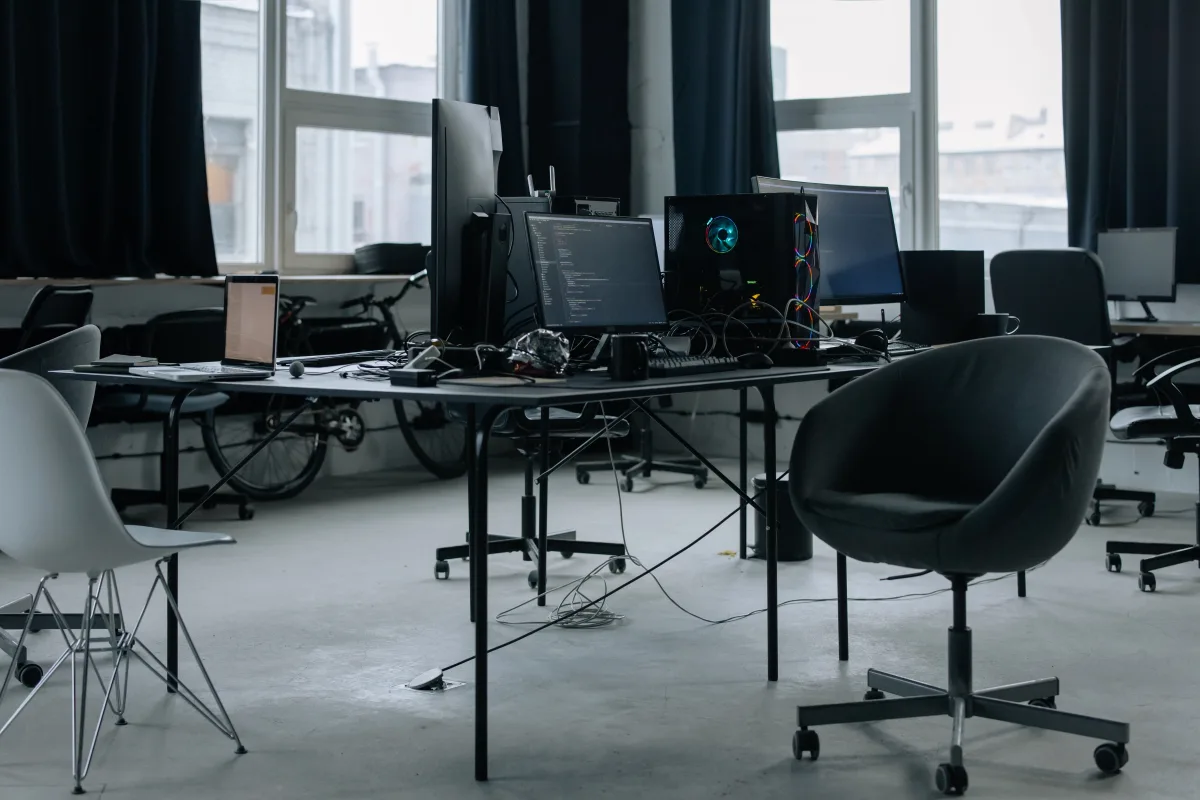
A 40-person company signing a new lease with a $150,000 outfitting budget doesn't have a furniture problem or a software problem in isolation — it has a sequencing problem. One real-world case: a company bought 60 fixed desks before finalizing its remote-work policy. Eighteen months later, 20 of those workstations sat permanently empty, representing roughly $35,000 in sunk furniture cost plus the ongoing square-footage expense of housing them.
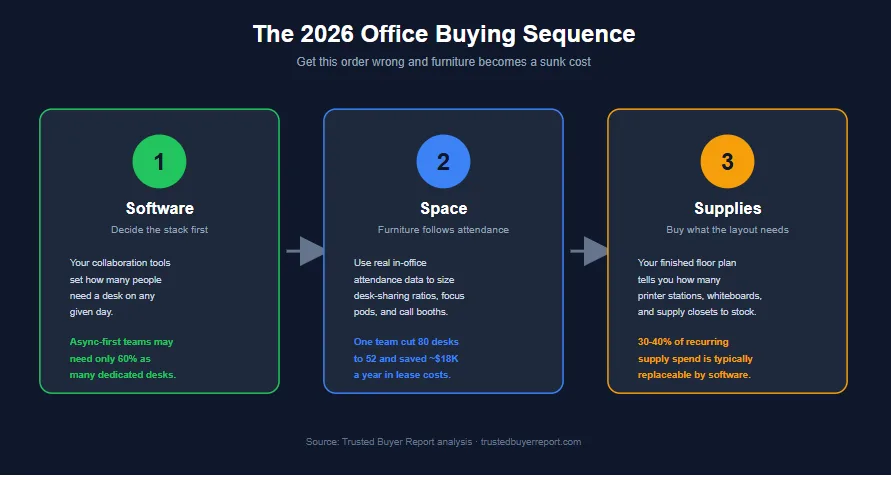
The structure that avoids this: software first, space second, consumables last. Each later decision should be built on top of the one before it, not made in parallel with it.
The 2026 office buying sequence: each stage should be sized by the decision before it.
How Office Budgets Are Shifting in 2026
The three core office-spending categories are moving in three different directions, and that split should directly shape how a budget gets allocated.
Traditional office supply retail is shrinking. According to IBISWorld's Office Supply Stores in the US industry report, the category will reach roughly $8.3 billion in revenue in 2026, a 0.6% drop from the prior year and part of a five-year decline averaging 2.2% annually. Cloud-based workflows are displacing paper, toner, and physical filing, while more of the remaining demand is shifting to online and discount retailers.
Business software is moving in the opposite direction. Research and Markets sizes the global business software market at $659.3 billion in 2026, up from $593 billion in 2025, with growth projected to reach $1.28 trillion by 2031 — an 11.71% compound annual growth rate. Software now claims the largest and fastest-growing share of most office budgets.
Furniture sits in between. Research Nester puts the global office furniture market at $56.7 billion in 2026, growing to $109.8 billion by 2035. In the US specifically, Mordor Intelligence estimates a $11.47 billion market in 2026, rising to $14.94 billion by 2031 at a 4.92% CAGR, driven mainly by hybrid-work redesigns and ergonomic demand.
Office supplies are shrinking, furniture is growing modestly, and software now dominates most office budgets.
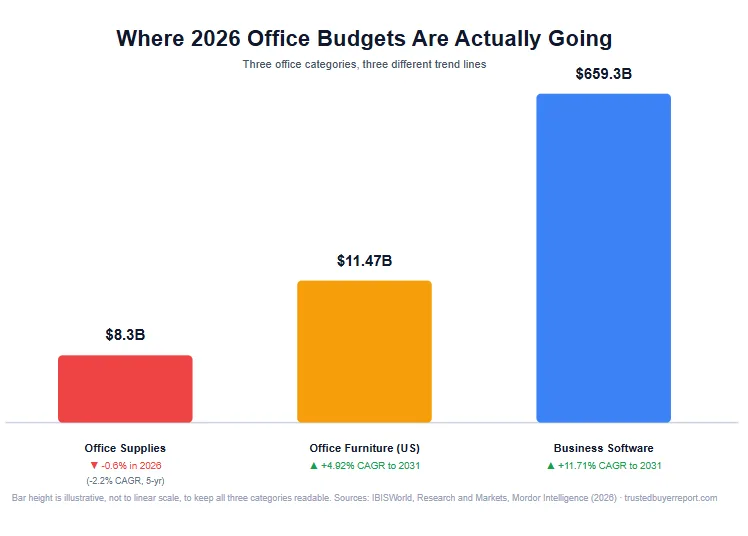
What this means for your budget: if 25–30% of your office spend is still going to paper-based consumables, you're over-funding a declining category at the expense of two growing ones. A company that spent $12,000 a year on paper, toner, and filing in 2019 should be spending a fraction of that in 2026 — and putting the difference into ergonomic workstations and integrated software.
Step 1: Decide Your Software Stack Before Anything Else
The most expensive procurement mistake is buying furniture for a headcount your future hybrid policy will never actually fill. Software decisions should come first because they determine attendance, and attendance determines everything that follows.
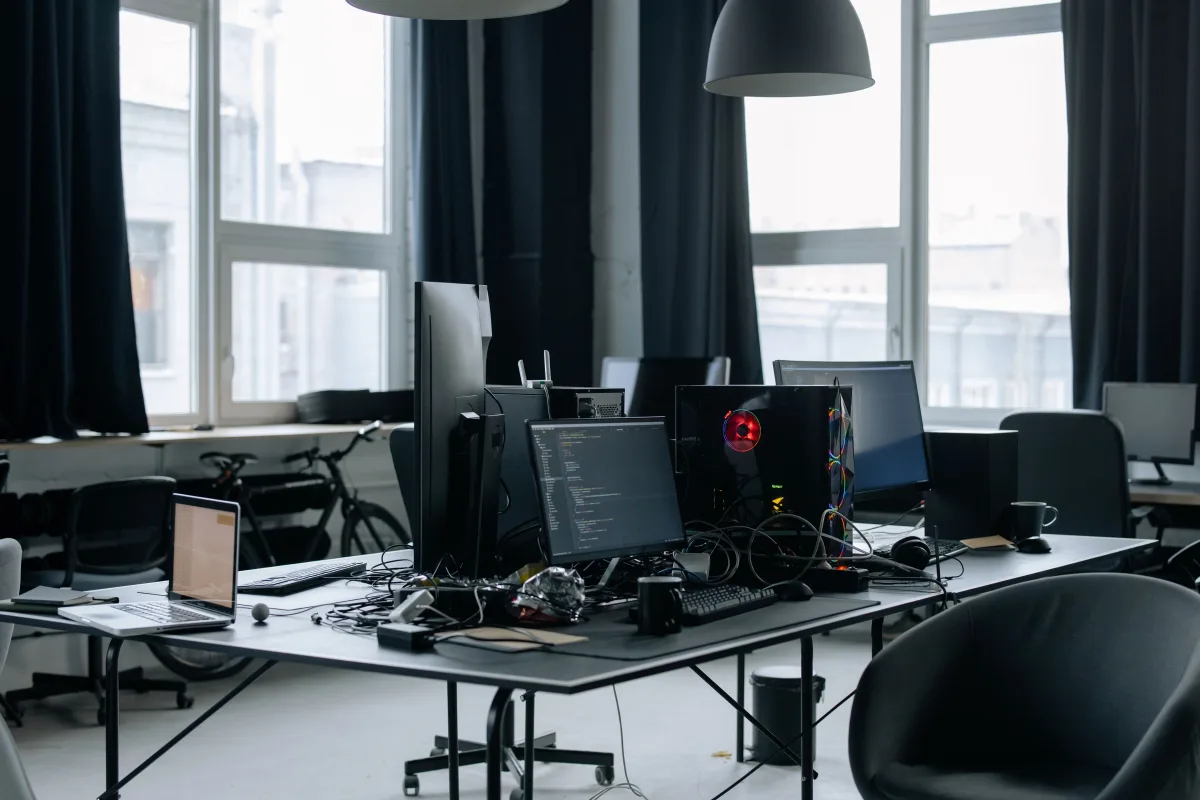
A team using async-first tools (Notion, Linear, Basecamp) may need only about 60% as many dedicated desks as its headcount suggests, since people aren't all in the building on the same day. A team running synchronous, in-person-heavy workflows needs a desk ratio closer to 1:1.
Before talking to any vendor, write a one-page procurement brief covering: expected daily in-office headcount, your primary collaboration model (synchronous vs. asynchronous), sustainability commitments, and a three-year growth projection. Use this brief as the filter for every furniture and software pitch you receive afterward.
This isn't just a cost question — it's a productivity one. Research from the American Society of Interior Designers (ASID), cited in Rosi Inc.'s office furniture buying guide, found that 90% of employees say office design directly affects their productivity. That cuts both ways: a well-sequenced design amplifies productivity, while furniture purchased before software decisions are locked in creates friction no ergonomic chair can fix.
What Office Supplies Are Still Worth Buying in 2026?
Short answer: not "paper vs. digital," but "which physical items create value software genuinely can't replace?" Roughly 30–40% of a typical recurring supply budget falls into a category that can be eliminated with software, but a meaningful slice still earns its place.

Categories to cut or reduce
- Copy paper and printer consumables. Digital signature tools (DocuSign, Adobe Acrobat Sign) remove the biggest driver of paper use — contract workflows. A mid-sized company processing 200 contracts a year can shrink most of its paper budget for the cost of a single $35/month subscription.
- Physical filing systems. Lateral file cabinets and hanging folders are sunk-cost thinking once cloud document management (Google Drive, SharePoint, Dropbox Business) offers lower cost and far better search.
- Fax-related supplies. There's no remaining use case that justifies the line item.
- Single-use plastic items. ESG and sustainability commitments make disposable plastics an increasingly poor purchase regardless of upfront cost.
Categories still worth buying
- Quality writing instruments. Pens like the Pilot G2 and Uni-ball Jetstream still earn their keep for in-person ideation, annotation, and signing — buy fewer, buy better.
- Physical whiteboards. Digital whiteboard tools (Miro, FigJam) handle remote collaboration well, but a physical whiteboard still outperforms a screen for in-person brainstorming. One per meeting room is the right ratio; ten across an open floor plan is not.
- Ergonomic desk accessories. Monitor risers, cable management, keyboard trays, and document holders cost $25–$85 each, deliver measurable comfort gains, and have no digital substitute.
- Cleaning and hygiene supplies. Non-negotiable — post-pandemic baseline expectations are now permanent.
IBISWorld notes that eco-friendly and electronic products represent the one growth segment within physical supplies, so prioritizing recycled-content paper, refillable ink systems, and energy-efficient devices lines up with both market direction and good procurement practice.
Run a quarterly supply audit. For every SKU you reorder, classify it as essential (no digital substitute exists), reducible (still needed, but in smaller quantities), or replaceable (a software tool can eliminate it entirely). Most organizations find that 30–40% of recurring spend lands in the replaceable bucket.
Ergonomic Office Furniture: How to Evaluate Chairs, Desks & Layouts
An 8.5% CAGR through 2035 in the global furniture market isn't an accident — it reflects real demand from organizations redesigning around ergonomic health and hybrid work. It also means more vendors and more marketing noise, so evaluating on functional spec rather than brand name matters more than ever.

Ergonomic chairs: what to look for
The minimum spec for a 2026 office chair: independently height-adjustable lumbar support (not just present), at least 2 inches of seat-depth adjustment, armrests adjustable in height, width, and pivot angle, and a breathable mesh or high-density foam back.
- Professional-grade benchmarks: Herman Miller Aeron ($1,395–$1,795) and Steelcase Leap V2 ($1,299–$1,599).
- Strong alternative for hot-desking: Humanscale Freedom ($1,200) — its self-adjusting recline needs less per-user configuration, which matters when different people use the same chair daily.
- Mid-range: Branch Ergonomic Chair ($379) and Autonomous ErgoChair Pro ($399) offer adjustability close to chairs costing twice as much, at the cost of shorter warranties and less refined build quality.
- Entry-level: HON Ignition 2.0 ($289–$359) is a reliable option with genuine lumbar adjustment.
Sit-stand desks: what to look for
Check height range first — a desk needs roughly a 22"–48" range to fit users from 5'0" to 6'4". Motor noise matters more than most buyers expect in open-plan offices.
- Uplift V2 ($599–$799 for a standard frame) is consistently rated among the quietest dual-motor options.
- Flexispot E7 ($349) offers comparable stability at a lower price point.
Both include programmable memory presets, which matter in hot-desking setups where users need to recall their preferred height quickly.
Modular systems and biophilic design
A 20-person startup using a modular system from Haworth or Knoll's Antenna Workspaces line was able to reconfigure from open-plan to hybrid-pod layout without buying new furniture — just by redeploying panels, adding acoustic screens, and repositioning desk clusters. Modular systems typically cost 20–35% more upfront than fixed furniture, but that premium pays back within two to three years if your team size or layout changes even once.
Biophilic elements — natural light access, live plants, wood and stone finishes — are increasingly part of furniture planning, and the ASID research cited above supports a measurable wellbeing benefit. Practically, that means choosing wood-veneer or bamboo surfaces over all-plastic options and clustering desks near windows rather than interior walls.
Designing Focus Zones vs. Collaboration Zones for Hybrid Teams

Hybrid work has created two distinct space types that need different furniture specs, and getting the ratio wrong is the most common layout mistake of 2026.
Focus zones need acoustic management, visual privacy, and individual ergonomic control: sit-stand desks, high-back task chairs with headrests, monitor arms, and acoustic desk screens (Framery, BuzziSpace, or Offecct panels, $185–$350 per panel). These spaces work best when bookable through desk-reservation software.
Collaboration zones need mobility and built-in technology: tables on casters (the Steelcase Verb table, $889–$1,200, is a strong option), stackable chairs (Knoll's Multigeneration chair stacks cleanly and stays comfortable for 90-minute sessions), and modular soft seating that rearranges in minutes. Every collaboration zone also needs a video-call spec: a minimum 90dB acoustic rating for enclosed booths, a camera shelf at eye level (roughly 54–58 inches from the floor), USB-C and HDMI power access, and a display mount rated for at least a 55" screen.
One company used badge-swipe and desk-booking data from its workplace management software to find that 40% of its fixed desks sat unused on Tuesdays and Thursdays. It converted those areas into four six-seat collaboration pods, cut its total desk count from 80 to 52, and reduced its lease cost at renewal by roughly $18,000 a year.
As VividWorks notes, facilities teams increasingly rely on data analytics to track desk utilization and optimize layout. If your workplace management platform (Robin, Envoy, or OfficeSpace are common choices) already exports occupancy data, pull it before finalizing any furniture order — guessing at the focus-to-collaboration ratio is how teams end up with the wrong mix.
How to Choose Business Software in 2026 Without Getting Overwhelmed
A $659.3 billion software market isn't a discovery problem — it's a filtering problem. The core skill in 2026 software procurement is elimination, not exploration.
Start with a workflow audit, not a vendor list
Before opening a single vendor website, map your team's five highest-frequency recurring processes. For each one, note where manual steps exist, where data gets re-entered across systems, and where communication gaps cause delays or errors. This audit takes two to three hours and typically eliminates around 60% of the demos you'd otherwise sit through.
Five questions to ask during the audit:
- Which process, if automated, would save the most hours per week?
- Where does work stall waiting on a human decision that could be rule-based instead?
- Which tools do people work around with spreadsheets, email threads, or sticky notes because the official system isn't good enough?
- Which data lives in two or more systems when it should live in one?
- Which reports take more than two hours a week to compile manually?
Which software categories deserve priority?
Most organizations need tools across five categories: project management, CRM, HR/HCM, accounting/ERP, and communication/collaboration. The mistake is buying enterprise-grade tools in all five at once. Put depth where your workflow audit found the most friction, and accept mid-tier tools in categories that are already working fine.
The CRM market specifically is expanding at a 9.80% CAGR from 2026 to 2030, reaching $86.55 billion by 2030, according to Statista data cited by iTransition. For HR/HCM software, the ISG Research 2026 Buyers Guide for HCM Suites evaluates vendors on both product experience and customer experience — a useful two-lens framework that applies well beyond HCM.
Is AI a real differentiator or just marketing noise?
MGI Research's CPQ Top 35 Buyer's Guide 2026 makes a point that holds across nearly every software category: vendors that can't differentiate on core functionality often lean on generic Gen AI claims instead, which adds buyer confusion rather than real value. Before "AI-powered" moves a vendor up your shortlist, ask for a specific, measurable workflow it improves — not a feature-list bullet point.
Office Buying FAQ
Should I buy furniture or software first for a new office? Software first. Your collaboration model (synchronous vs. asynchronous) determines how many people are actually in the building on a given day, which is the input furniture decisions depend on.
How much should office supplies cost compared to furniture and software? There's no universal ratio, but if paper-based consumables still account for 25–30% of your office budget, that's a signal to shift spend toward furniture and software, since the supply category is shrinking nationally while the other two are growing.
Are modular office furniture systems worth the extra cost? Usually yes if your team size or layout is likely to change. Modular systems cost 20–35% more upfront but typically pay that back within two to three years through reconfiguration savings instead of new furniture purchases.
What's the biggest mistake companies make when buying office furniture? Buying for headcount instead of actual attendance. Fixed desks purchased before a hybrid policy is finalized are the single most common source of wasted office furniture budget.
Final Recommendation: Match the Sequence to Where You Are
If you're outfitting a brand-new office, start the software-first, space-second, supplies-last sequence from scratch and use the one-page procurement brief before any vendor conversation. If you're auditing an existing setup, start with the quarterly supply audit and the desk-utilization data — both surface savings (often in the 30–40% range on supplies, and tens of thousands of dollars on furniture/lease costs) without requiring a single new purchase. For a deeper look at the specific office tech and remote-work hardware that fits this kind of setup, see our best webcams for remote work and streaming guide, and browse verified office and business retailers for current pricing on the categories covered here.
This guide is based on industry market research, manufacturer specifications, and third-party reporting from the sources cited throughout. It does not reflect hands-on testing of the furniture or software products named. How we review · How we use AI
Trusted Buyer Report may earn a commission when you use our links to make a purchase, at no extra cost to you. Full affiliate disclosure.