

Researched with AI assistance and reviewed by the Trusted Buyer Report editorial team. We earn a commission from purchases made through links on this page — added only after our research is complete. Full disclosure →
TL;DR — Key Takeaways
- Most small businesses overpay by buying the wrong tier, not the wrong tool — the basic plan covers 80% of real needs.
- Accounting software should be your first investment if you can't produce a P&L on demand or if invoicing is inconsistent.
- Productivity tools (project management, collaboration) should only follow once you've fixed the financial visibility gap — buying both at once multiplies integration complexity.
- FreshBooks and Zoho Books are the strongest value options for businesses under 20 employees. QuickBooks Online wins when you have an existing CPA relationship.
- Free trials are non-negotiable: import your real data, not a demo dataset.
Most small businesses don't have a software problem. They have a sequencing problem.
A 5-person consulting firm buys QuickBooks Online's Advanced plan — with multi-entity reporting and job costing — when the Simple Start tier would cover every real need at less than a third of the price. A 10-person team pays for an enterprise project management suite with AI resource forecasting no one ever configures. These aren't edge cases; they're the default pattern.
The cost of that mistake isn't just the monthly fee. It's the productivity drain of configuring tools you don't need, training staff on features that never get used, and the switching cost when you eventually move — data migration, retraining, lost institutional memory.
This guide solves the sequencing problem before it becomes a product comparison problem.
Which Software Category Should You Invest in First?
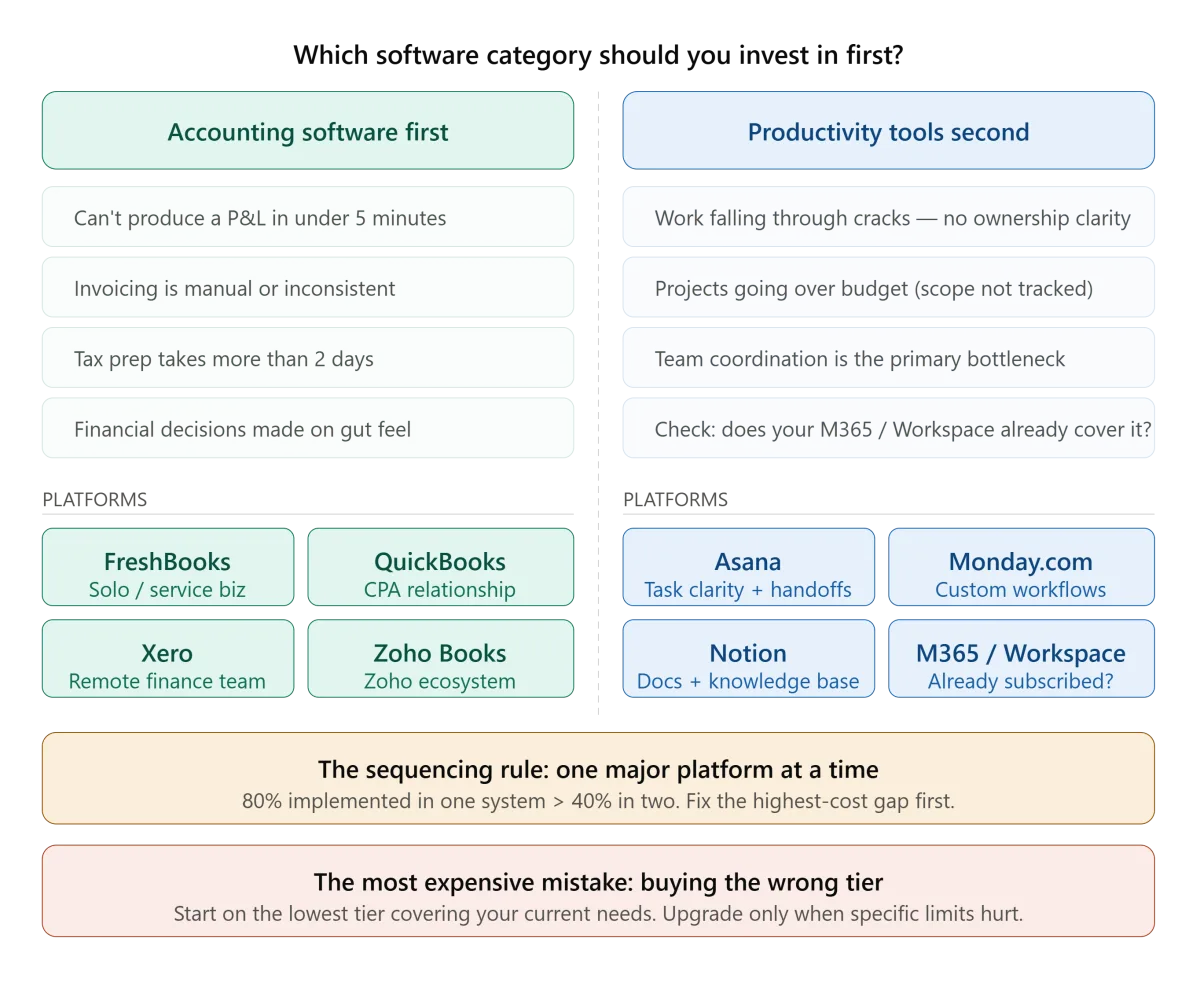
Before comparing any specific products, answer three diagnostic questions honestly:
1. Can you produce a profit-and-loss statement in under five minutes? If the answer is no, accounting software is your highest-priority investment. Financial decisions made on gut feel — or on a spreadsheet that's three weeks out of date — are the single most common reason small businesses fail to catch cash flow problems early enough to course-correct.
2. Are invoices going unpaid because billing is manual or inconsistent? Late or missed invoicing is a symptom, not a character flaw. If your billing process requires manual effort to remind clients, track payment status, or reconcile what was billed against what was paid, you're losing money every month to process friction. Accounting software with automated invoicing solves this directly.
3. Are team coordination failures visibly costing more time than software would? Productivity and project management tools only earn their cost when the team's primary bottleneck is coordination — not execution, not clarity about priorities, not financial visibility. If you're still unclear on your financial position, fixing that first will free up more decision-making capacity than any task management tool.
The sequencing rule: one major platform at a time. Software that's 80% implemented in two systems delivers less value than software that's 100% implemented in one. Pick the category where the operational gap is most expensive, implement it fully, then evaluate the next.
Accounting Software in 2026: The Features That Actually Matter

Four features form the non-negotiable core of any small business accounting platform:
- Automated bank feeds that sync transactions daily — eliminating manual entry and reducing reconciliation errors
- Online invoicing with the ability to accept payments directly in the invoice
- Bank reconciliation tools that match transactions against your records
- Financial reporting for profit/loss, cash flow, and account balances on demand
If a platform reliably covers these four, it meets the needs of the majority of small businesses. Everything else is a tier upgrade you may or may not need.
Here's how the additional features map to business types:
| Business Type | Critical Add-On Features |
|---|---|
| Service businesses (hourly billing) | Time tracking + project-based invoicing |
| Retail / distribution | Inventory management |
| Businesses with employees | Payroll integration |
| Multi-stakeholder finance teams | Multi-user access + remote collaboration |
| Businesses using a CRM | Native CRM integration to eliminate data entry |
The most common mistake is defaulting to QuickBooks Online because it dominates brand recognition — then buying a tier with features the business won't use for years. QuickBooks is genuinely excellent. But its higher tiers include advanced inventory, job costing, and multi-entity reporting that a 5-person service firm will never configure.
Comparing Accounting Platforms: Matched to Business Type
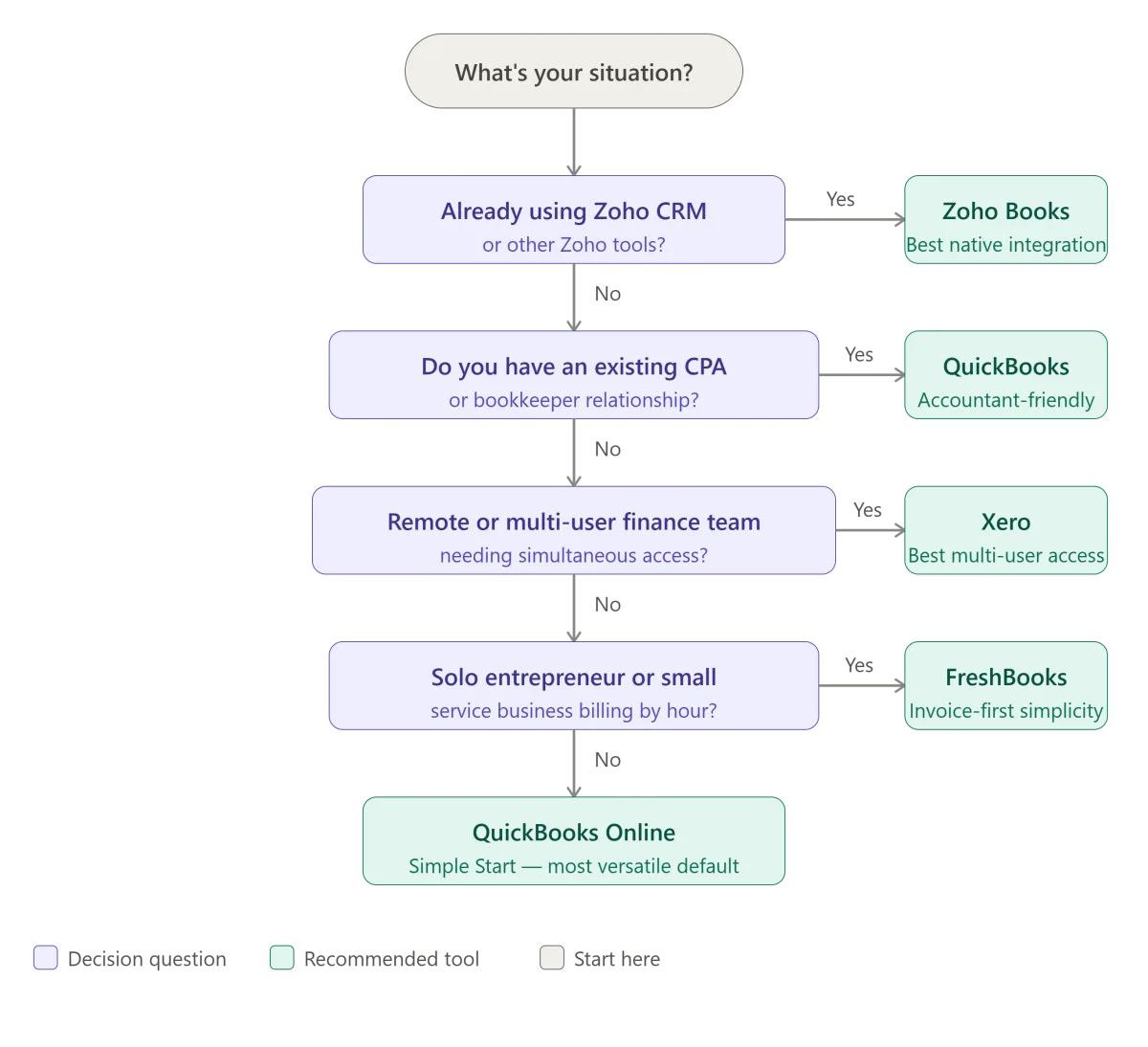
The following matches are based on scenario analysis from Business.com's 2026 accounting software guide, PCMag's 2026 accounting software testing, and Business News Daily's platform comparison. Trusted Buyer Report has not conducted hands-on testing of these platforms; recommendations reflect aggregated research and cited sources.
FreshBooks — Best for solo entrepreneurs and service businesses
FreshBooks is built invoicing-first. It's the most intuitive option for businesses whose primary accounting need is getting paid accurately and on time — freelancers, consultants, and small service firms billing by the hour or by project.
What it does well: The invoicing workflow is genuinely fast, with native time tracking that converts logged hours directly into invoiced amounts. Payment reminders are automated. The dashboard is clean enough that non-accountants actually use it.
What it doesn't cover: FreshBooks is not the right tool for businesses with complex inventory, payroll at scale, or multi-entity financial structures. It's built for simplicity, which means clear limits at the high end.
Who should skip it: Any business that needs to manage purchase orders, track inventory levels, or run multi-currency reporting should look elsewhere.
QuickBooks Online — Best when you have an existing CPA relationship
QuickBooks Online's primary advantage isn't its feature set — it's ecosystem depth. The majority of US bookkeepers and CPAs already know it, which means your outside accountant can log in and work without a learning curve. That coordination benefit has real dollar value.
What it does well: Bank reconciliation, payroll integration (via QuickBooks Payroll), and the breadth of its accountant network. Its app integrations are extensive.
The tier trap to avoid: QuickBooks Simple Start covers invoicing, expense tracking, bank reconciliation, and basic reporting — enough for most small businesses. The jump to Plus (inventory, project tracking) or Advanced (custom reporting, multi-user batch invoicing) is only justified when you've actually outgrown the lower tier. Starting on a higher tier "for room to grow" is the most common overpayment pattern.
Pricing note: Per Business.com's 2026 data, QuickBooks Online tiers range from the Simple Start plan for solo use to higher-tier plans for teams needing advanced features. Always verify current pricing directly at quickbooks.intuit.com, as promotional rates frequently differ from standard rates.
Xero — Best for remote finance teams or multi-stakeholder access
Xero's multi-user collaboration features are its distinguishing strength. Businesses with remote finance teams, multiple partners who need simultaneous access to financial data, or a bookkeeper and CPA both working in the same system will find Xero's interface and permission controls better suited to that workflow than QuickBooks.
What it does well: Bank reconciliation workflow is particularly clean. The interface is less cluttered than QuickBooks for new users. Multi-user access is included at lower tiers than comparable QuickBooks plans.
The honest trade-off: Xero is less dominant in the US accountant ecosystem. If your local CPA works primarily in QuickBooks, switching to Xero may create coordination friction that offsets the interface advantages. Ask your accountant before committing.
Zoho Books — Best value for businesses in the Zoho ecosystem
If you're already using Zoho CRM, Zoho Desk, or other Zoho products, Zoho Books is the strongest value choice in the market. The native integration between Zoho Books and Zoho CRM alone — eliminating the need for middleware or manual data transfer between sales and accounting — can justify the choice entirely.
PCMag's 2026 testing found Zoho Books' depth in inventory management, sales and purchase tracking, and time/project tracking to be comparable to — and sometimes ahead of — more prominent competitors. The trade-off is the same one that applies to any less-ubiquitous platform: outside accountants and CPAs are less likely to know it.
Who it's for: Businesses already operating in the Zoho ecosystem, or businesses that prioritize cost and native integration over accountant familiarity.
Who it's not for: Businesses whose CPAs strongly prefer QuickBooks or Xero — the coordination overhead will exceed the cost savings.
Oracle NetSuite — Only if you're already asking whether you need it
NetSuite is ERP-level financial management: multi-currency, multi-entity, advanced revenue recognition, complex consolidation reporting. The cost and implementation complexity are significant. If you're a fast-scaling business preparing for institutional investment or managing operations across multiple legal entities, NetSuite may be appropriate. For everyone else: you'll know when you need it, because the gaps in simpler tools will become specific and painful.
What to Check Before Committing to Any Accounting Platform
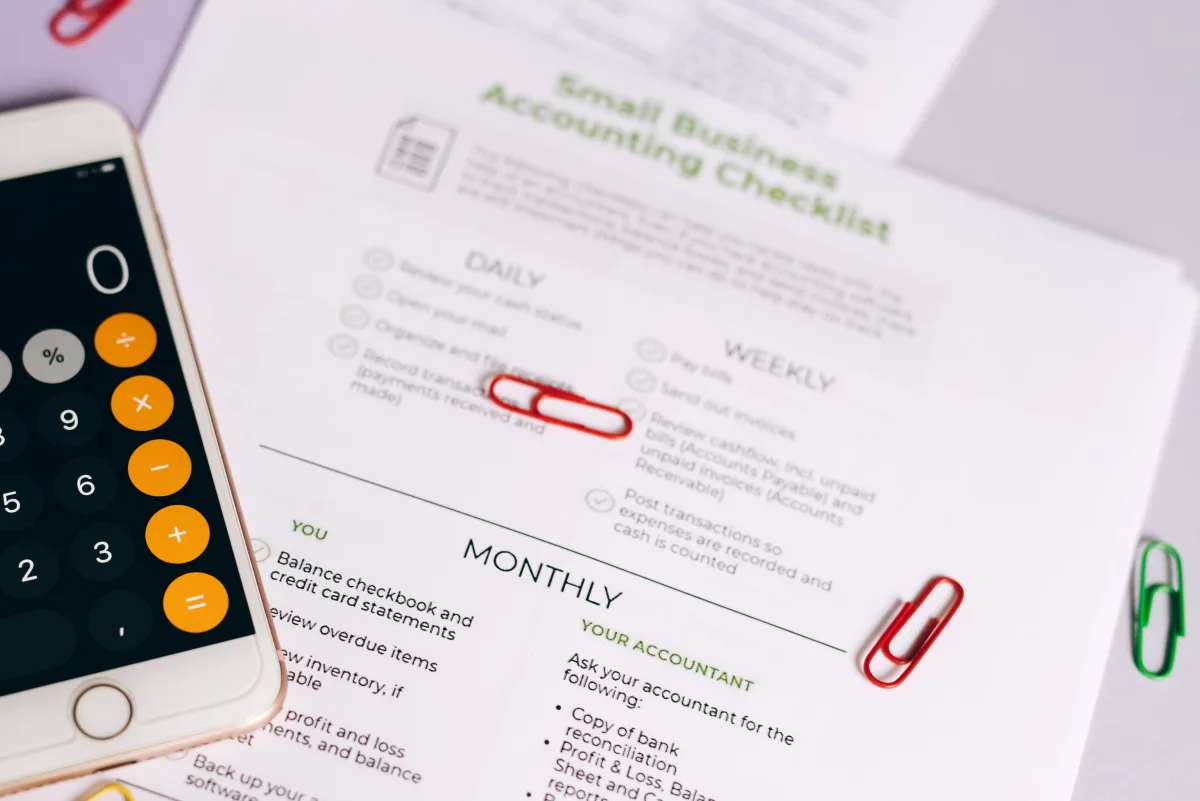
Use this checklist before entering a credit card for any paid plan:
Run the trial with your real data, not a demo. Import actual transactions from your bank. Create an invoice for a real client. Run a P&L report. Generic demos don't surface the friction points — your own workflow does.
Verify integration with tools you already use. Your accounting software should connect cleanly to your existing payment processor, payroll provider, and (if applicable) CRM. A gap in any of these connections creates manual data entry that offsets the software's value.
Calculate total cost of ownership — not just per-seat price. Add implementation time (even self-implementation has an opportunity cost), any training time, and integration middleware fees if native connections don't exist. Per-seat price is the starting point, not the endpoint.
Ask your accountant or bookkeeper first. If you work with an outside accountant, their platform preference should carry significant weight. A tool your accountant won't use — or will use reluctantly — creates friction that costs more than the software saves.
Start on the lowest tier that covers your actual current needs. You can upgrade. Downgrading is harder, and most platforms make you migrate data when moving between tiers. Start small, verify what you use, and upgrade when specific features become genuinely necessary.
Productivity Software in 2026: Solving the Right Problem
Productivity and project management tools have the highest rate of software disappointment of any business software category — not because the tools are bad, but because they're purchased to solve problems that aren't actually coordination failures.
Before investing in any productivity platform, identify the actual bottleneck:
- If work is falling through the cracks because nobody knows who owns what, a task management tool directly solves the problem.
- If projects are going over budget because scope changes aren't tracked, project management software with change-order tracking helps.
- If meetings are inefficient because there's no shared context before the meeting, a documentation tool (Notion, Confluence) may matter more than task management.
- If the team is working across time zones and real-time collaboration is difficult, asynchronous tools (Loom for video, Notion for docs, Slack for async messaging) have a higher ROI than synchronous project management software.
The category has consolidated around a few dominant platforms, each with a different primary use case:
Asana — Best for team task and project tracking
Asana's strength is visibility: who owns what, when it's due, and how it connects to broader project goals. It's a good fit for teams that manage recurring project types (marketing campaigns, product launches, client onboarding) with multiple stakeholders and handoffs.
The honest limitation: Asana is a task and project management tool, not a documentation platform. Teams that need both task tracking and rich document collaboration will often end up paying for Asana and a documentation tool separately — a cost that should be modeled before committing.
Monday.com — Best for teams that need visual workflow customization
Monday.com's interface is more flexible than Asana's — boards can be configured to represent workflows that don't fit a standard task-list model. It's particularly well-suited to operations teams, agencies, and teams with non-standard processes.
The trade-off: more flexibility means more setup time. Monday.com boards require initial configuration to be useful, and that configuration effort is real. Asana is faster to get running out of the box.
Notion — Best for documentation-first teams
Notion occupies a different space than Asana or Monday.com. It's primarily a documentation and knowledge management tool that has added task management features — not the other way around. Teams that produce a lot of internal documentation, SOPs, and structured reference material get more value from Notion than teams whose primary need is task tracking.
Notion's task management is functional but not deep. If your team's primary bottleneck is task visibility and handoff clarity, Asana or Monday.com is a better fit. If the bottleneck is "we don't have a shared brain," Notion is worth evaluating.
Microsoft 365 / Google Workspace — The default that's already there
Before purchasing any standalone productivity platform, audit what you already have. Microsoft 365 (Teams, Planner, SharePoint, OneNote) and Google Workspace (Meet, Tasks, Drive, Docs) both include project management and collaboration features that cover the needs of many small teams. The tools aren't as purpose-built as Asana or Notion, but the integration with email, calendar, and file storage often makes them more practical than adding a fourth platform.
Does Your Business Need Both Accounting and Productivity Software?
Most growing small businesses eventually need both — but the timing matters. Buying both simultaneously means:
- Two onboarding processes running in parallel
- Integration between them to configure (or pay for)
- Staff splitting attention across two new systems
- Double the troubleshooting when something doesn't work
The better path: fix the highest-leverage gap first. For most businesses under 20 employees, that's financial visibility. Once invoicing is clean, bank reconciliation is current, and you can produce a P&L on demand, productivity software becomes the next lever — not a simultaneous investment.
When you do connect the two, verify whether a native integration exists before paying for middleware. Zoho Books ↔ Zoho CRM and QuickBooks Online ↔ most major project management platforms have direct connections. Check the integration library on both platforms before assuming you'll need Zapier.
Final Decision Framework

| Your Situation | Recommended Starting Point |
|---|---|
| Solo entrepreneur or small service business | FreshBooks (invoicing simplicity) or Zoho Books (if you're already in Zoho) |
| Small business with an existing CPA | QuickBooks Online — start on Simple Start, upgrade only when you've outgrown it |
| Remote finance team or multi-user access needed | Xero |
| Already using Zoho CRM or Zoho Desk | Zoho Books |
| Team coordination is the main bottleneck | Asana (task clarity) or Notion (documentation-first) |
| Large Microsoft or Google Workspace investment already | Audit what you already have before adding a third platform |
One principle to carry into any software decision: the return on implementation — not on purchase — is what determines whether software pays off. A tool you've fully configured and trained your team on at a lower tier will deliver more value than a premium platform half-implemented.
Frequently Asked Questions
What accounting software is best for a very small business or sole proprietor?
FreshBooks is the most intuitive option for sole proprietors and small service businesses, given its invoicing-first design and native time tracking. Zoho Books is the best value for businesses already using other Zoho tools. QuickBooks Online's Simple Start tier works well if you have an accountant who prefers that platform. Avoid purchasing advanced tiers of any platform until you've genuinely outgrown the basic features — most small businesses don't.
How much does accounting software cost for small businesses in 2026?
Entry-level plans for the leading platforms (FreshBooks Lite, QuickBooks Simple Start, Zoho Books Standard) typically range from around $15 to $35 per month. Mid-tier plans with additional users, inventory, and payroll integration generally run $40–$80 per month. Enterprise features (multi-entity, advanced reporting) start at $100+ per month. Always verify current pricing directly with the vendor — promotional rates are common and can differ significantly from list prices.
Do I need accounting software if I already use a spreadsheet?
Spreadsheets work until they don't — and the failure mode is usually invisible until it's expensive. Bank reconciliation errors, missed invoices, and manual calculations that drift over time are common problems that accounting software eliminates. The specific trigger to switch: if tax preparation takes more than two days, if you've made a financial decision based on numbers that later turned out to be wrong, or if a client has ever paid you late because the invoice wasn't sent on time.
Which productivity tool is best for a team of 5–10 people?
For most teams of this size, the answer is the tool your team will actually use. Asana is the easiest to onboard for task tracking. Notion is better if documentation and knowledge management matter as much as task tracking. Monday.com suits teams with non-standard workflows. And before buying anything standalone: check whether your existing Microsoft 365 or Google Workspace subscription already includes features that cover your needs.
What's the biggest mistake small businesses make when buying software?
Buying the wrong tier of the right tool — not the wrong tool. Most platforms offer multiple tiers, and the default purchase behavior is to buy "room to grow" rather than what's needed now. Advanced features that aren't configured and used don't create ROI. Start on the tier that covers your current reality, use it fully, and upgrade when specific limits become genuinely painful.
This guide is based on publicly available research, manufacturer documentation, and editorial analysis aggregated from cited sources. It does not reflect hands-on testing by Trusted Buyer Report. Recommendations should be evaluated alongside your own free trial experience with each platform.