This guide was researched using published testing data from Consumer Reports, CNET, Architectural Digest, BTOD, Forbes Vetted, Wired, TechRadar, and Yahoo Shopping — representing dozens of individual testers across different body types and heights. It does not reflect hands-on testing by Trusted Buyer Report. We may earn a commission when you use our links to make a purchase. This article was drafted with AI assistance and fact-checked by our editorial team before publishing.
Here's the uncomfortable truth about ergonomic office chairs: price does not equal fit. Consumer Reports purchased and evaluated 16 chairs ranging from under $200 to over $1,300 — and found that a $300 chair can outperform a $1,000 one for a specific body type, and vice versa. What actually determines whether a chair works for you is how precisely its adjustments match your body dimensions, your posture habits, and how many consecutive hours you sit each day.
Remote workers face a compounding version of this problem. The average WFH employee logs significantly more consecutive seated hours than office-based counterparts, who naturally break up their day by walking to meeting rooms, grabbing coffee, or visiting a colleague's desk. Every flaw in a poorly fitted chair is amplified by those extra hours. The 3pm backache that has become a daily WFH ritual is not inevitable — it is almost always a chair-fit problem with a specific, solvable answer.
This guide does not rank chairs by brand prestige or alphabetical order. It matches each recommendation to a concrete need: body type, pain point, work pattern, or budget ceiling. By the end, you will know exactly which chair to buy — or which feature to prioritize if you're shopping with constraints.
If you're setting up a full home office beyond the chair, our complete furniture and appliances buyer's guide for 2026 covers desks, storage, and every other major purchase in one place.
Why Most WFH Chairs Are Quietly Failing You

The U.S. Occupational Safety and Health Administration (OSHA) is direct on this point: good ergonomic design measurably reduces the number and severity of work-related musculoskeletal disorders caused by repeated stress on muscles, nerves, blood vessels, ligaments, and tendons. Consumer Reports cites this finding as the foundation of its chair-testing methodology. These are not minor inconveniences — they are documented occupational health conditions with real long-term consequences.
The business case for getting this right is also well-documented. Research cited by Apollo Technical found that companies investing in ergonomic workstations report an 11–25% productivity increase and a 32% jump in employee satisfaction. Even as a solo remote worker, those numbers translate to something tangible: fewer afternoon energy crashes, more sustained focus, and fewer sick days caused by preventable neck and back strain.
The gap between a chair's marketing claims and its actual fit performance is enormous. Consumer Reports' 16-chair test found that the label "ergonomic" has become nearly meaningless as a purchase signal — a chair can feature mesh, a lumbar pad, and adjustable height and still fail your specific body completely if the lumbar pad sits at the wrong position, the seat is too deep for your leg length, or the armrests force your shoulders upward.
What "Ergonomic" Actually Means in 2026 — The Features That Matter vs. the Ones That Don't

Before evaluating any specific chair, you need a working vocabulary for what actually separates a supportive chair from one that merely looks supportive. These are the features that consistently separate high-performing chairs from underperformers across testing by CNET, Forbes Vetted, Wired, Architectural Digest, and Consumer Reports.
Lumbar Support: The Most Critical Feature — and the Most Misunderstood
Lumbar support is the single most important feature for anyone sitting more than four hours a day, but its quality varies more than any other spec. Fixed lumbar pads — the foam bumps on most budget chairs — offer minimal real benefit because they cannot be repositioned to match your specific spinal curve. Adjustable lumbar systems that move up and down are meaningfully better. Independently adjustable upper and lower back systems — like the Herman Miller Aeron's PostureFit SL and the Anthros chair's dual-zone mechanism — are the most effective because they treat the sacrum and the lumbar spine as two separate anatomical zones that require independent support.
Seat Depth: The Feature Most Shoppers Skip
Seat depth is one of the most frequently overlooked specs and one of the most frequently wrong fits. As ergonomics expert Marko explains via Yahoo Shopping: taller individuals typically need more seat depth, while shorter individuals need less — with the seat ideally ending a couple of inches behind the knees. A seat that is too deep cuts off circulation behind the knees; one that is too shallow leaves the thighs unsupported and transfers pressure to the lower back. Seat depth adjustment is a feature worth paying for, particularly if you are shorter than 5'4" or taller than 6'2".
Armrests: What "4D" Actually Means
Armrests set too high push your shoulders upward, creating progressive neck and trapezius tension during long typing sessions. Marko notes that proper armrest height — one that doesn't push the shoulders up — can make a significant difference over the course of a day. 4D armrests adjust in four directions: height, width, depth, and pivot angle. This level of flexibility matters most for users who type extensively, use a graphics tablet, or regularly switch between multiple devices.
Tilt Mechanisms, Breathability, and Build Quality
Synchro-tilt mechanisms allow the seat and backrest to recline in a coordinated ratio, supporting natural movement rather than locking you into a single static posture. Lockable recline lets you fix your position when you need to concentrate. Breathable mesh backrests reduce heat buildup — a practical comfort factor that directly affects how many consecutive hours you can sit productively, especially in warmer home environments without dedicated air conditioning.
Warranty length is a reliable proxy for build quality. Architectural Digest's editorial team used a minimum seven-year warranty as a baseline quality filter for their 2026 recommendations. Finally, as Forbes Vetted's ergonomics advisor puts it: controls should be intuitive — understandable and usable without reading a manual. If you won't adjust your chair mid-workday, you won't get its ergonomic benefit.
How This Guide Was Researched

This guide synthesizes published hands-on testing from Architectural Digest, CNET, Forbes Vetted, BTOD, Wired, Yahoo Shopping, TechRadar, and Consumer Reports — representing dozens of individual testers across different body types, heights, and work patterns.
Evaluation criteria weighted in this guide: lumbar support quality, adjustability range, build material durability, warranty length, real-world comfort over full 8-hour sessions, and value relative to price tier. Chairs are grouped across three price tiers: budget (under $300), mid-range ($300–$700), and premium (above $700). Honest limitations are noted throughout — where testers flagged a consistent flaw, that flaw is included rather than softened.
Quick-Reference: 2026's Top Ergonomic Office Chairs at a Glance
| Chair | Best For | Lumbar System | Price Tier | Standout Limitation |
|---|---|---|---|---|
| Herman Miller Aeron | All-day sitters; warm environments | PostureFit SL (dual-zone) | Premium ($1,395+) | Must size correctly (A/B/C); high cost |
| Steelcase Gesture | Shoulder/neck pain; multi-device users | Limited | Premium ($1,100+) | Lumbar weaker than Aeron |
| Branch Ergonomic Chair Pro | Best value; average-height users | Excellent | Mid-range (~$500) | No lockable recline; headrest low for tall users |
| Anthros Chair | Chronic lower back pain | Independent upper + lower zones | Premium (~$1,950) | Specialized; poor value for general use |
| Autonomous ErgoChair Pro | Budget; wide seat; headrest needed | Adjustable | Budget (~$250) | Non-intuitive controls; less refined than Branch |
| Refurbished Steelcase Leap V2 | Premium features at entry-level price | Adjustable | Budget (~$300) | Availability varies by reseller |
Best Overall: Herman Miller Aeron
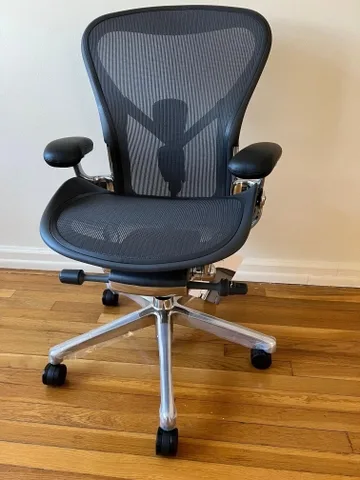
The Aeron is the most cross-referenced recommendation in 2026 ergonomic chair testing — appearing on "best of" lists from Architectural Digest, Forbes Vetted, Consumer Reports, and OfficeChairsUSA simultaneously. That level of cross-publication consensus does not happen by marketing alone; it reflects a chair that has been tested on many different bodies and performed consistently across them.
Its Pellicle mesh design promotes airflow across both the seat and back surface, making it particularly effective for warmer home office environments or users who run warm during long sessions. The PostureFit SL lumbar system supports both the sacrum and the lumbar spine as independent zones — a meaningful mechanical distinction from chairs that use a single fixed pad. OfficeChairsUSA identifies this dual-zone support as a core wellness differentiator from most competitors.
The Aeron comes in three sizes: A (smaller frames), B (average frames), and C (larger frames). Sizing correctly is not optional — it is how you access the chair's full ergonomic benefit. A size B Aeron on a frame that needs a size C will underperform substantially.
One limitation worth noting: at over $1,300 for a new unit, the Aeron is a significant investment. If you sit fewer than five hours daily or are working with a limited budget, the Branch Ergonomic Chair Pro (below) delivers comparable adjustability at roughly a third of the price.
Best suited for: Users who sit six or more hours daily, prioritize spinal health, and work in warmer environments where mesh breathability matters. The strongest all-around ergonomic choice for users who want a single chair that performs across all dimensions without supplementary cushions.
Best for Shoulder and Neck Pain: Steelcase Gesture
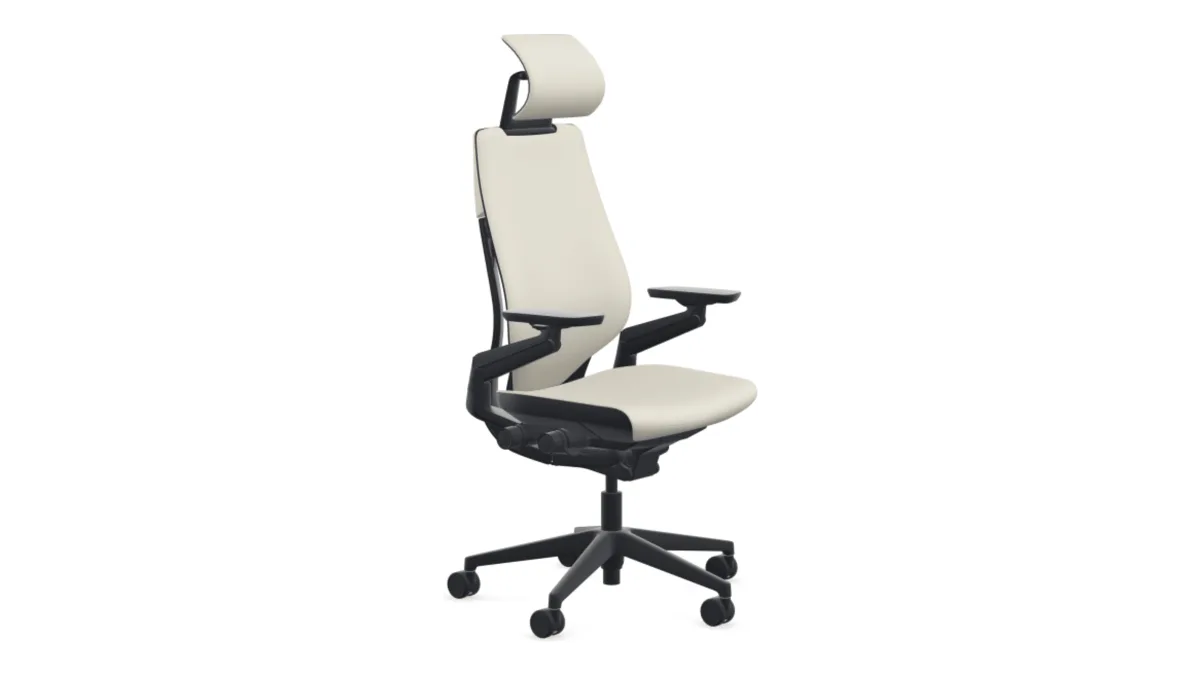
TechRadar's testing identified the Steelcase Gesture as having "possibly the best armrests on any chair" — a distinction that matters most for users who type extensively, use a stylus or drawing tablet, or regularly experience shoulder and neck tension. The Gesture's arm system is designed to follow the natural movement of the human arm across a wide range of positions, including tablet use and crossed-arm postures.
For multi-device WFH setups — keyboard, phone, secondary monitor — that flexibility is genuinely practical. The arms move with you rather than constraining your posture.
The trade-off is lumbar support. TechRadar's rating note is explicit: the Gesture's lumbar support is limited relative to its price point. Users with existing lower back concerns may find it insufficient on its own. Forbes Vetted pairs it alongside the Aeron as one of the two benchmark premium chairs, noting its strong tilt adjustment and armrest angle control — but users whose primary concern is lower back pain should look at the Aeron or Anthros instead.
Best suited for: Users whose primary complaint is shoulder, neck, or wrist tension from long typing sessions, and who are willing to supplement lumbar support with a separate cushion if needed. Not the right first choice for users whose main concern is lower back pain.
Best Mid-Range Chair: Branch Ergonomic Chair Pro (~$500)
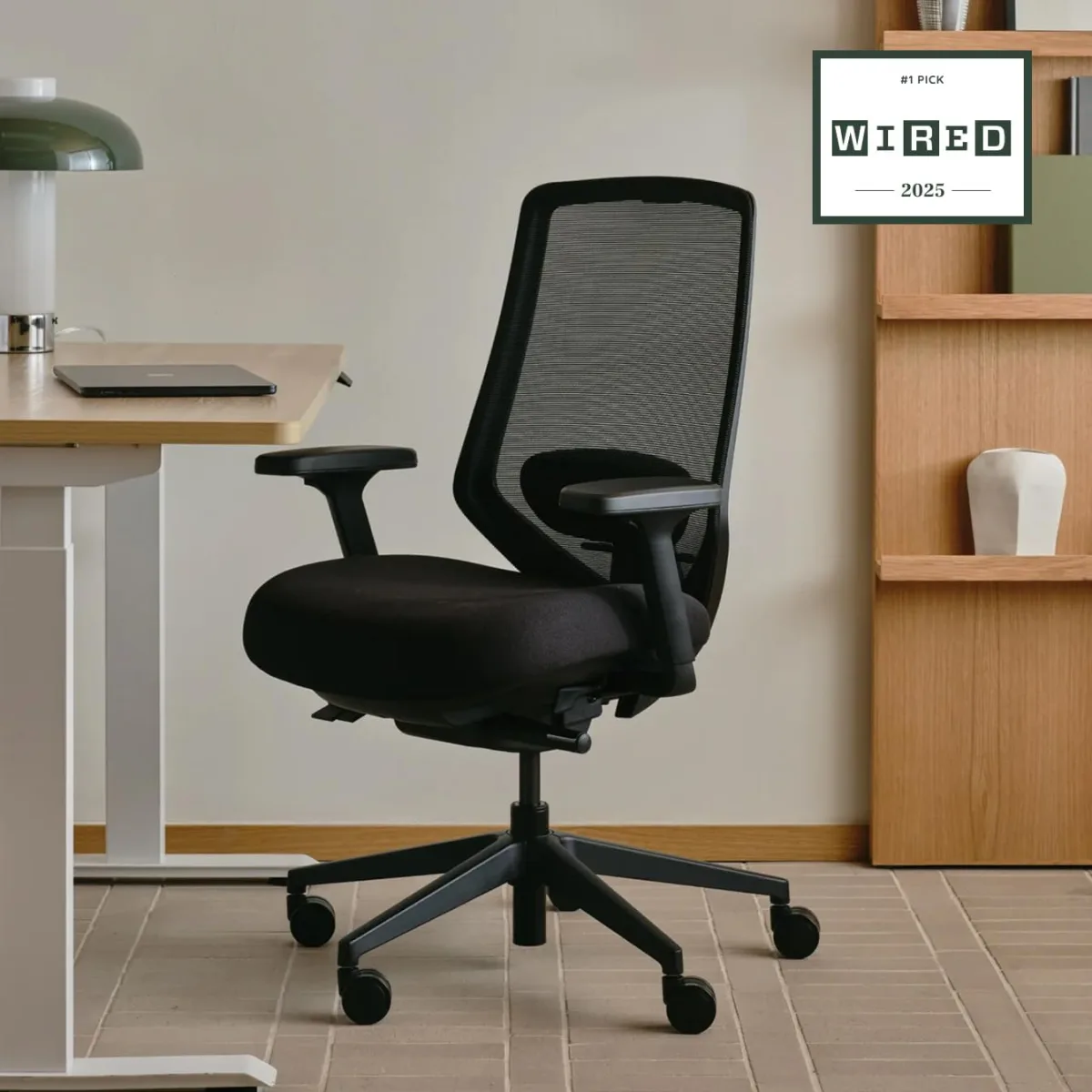
The Branch Ergonomic Chair Pro is the clearest evidence in 2026 that you no longer need to spend premium money to access genuine ergonomic adjustability. Forbes Vetted explicitly describes Branch as a direct-to-consumer brand that is "beginning to offer comparable adjustability at a lower price point" to Herman Miller and Steelcase — a significant statement from a publication that also recommends both of those chairs.
CNET's tester described the Branch Pro as feeling "incredibly well put together," specifically noting the solid metal wheel base (rather than the standard nylon base on most chairs in this price range) and build quality that "reflects the quality and pedigree of more expensive ergonomic chairs." The lumbar support received high marks, and the overall assembly was considered notably solid for the price.
Wired's testing found the Branch Pro to be the better buy compared to the Autonomous ErgoChair Pro at a similar price point, citing its overall feature balance. TechRadar rated it as a "superb office chair" but flagged the absence of a lockable recline for users who want precise control over their recline position throughout the day. One fit caveat: the headrest sits slightly low for users over 6'1", as noted in CNET's assessment for larger frames.
Best suited for: WFH users who want genuine ergonomic adjustability — good lumbar support, quality build, multi-point adjustment — at a mid-range price. Particularly strong for users of average height (5'4"–6'1") who prioritize lumbar support and build quality over headrest reach.
This chair also works well alongside a quality standing desk. If you're exploring the full ergonomic desk-plus-chair setup, our 2026 furniture buyer's guide covers desk options at every price tier.
Best for Serious Lower Back Pain: Anthros Chair (~$1,950)
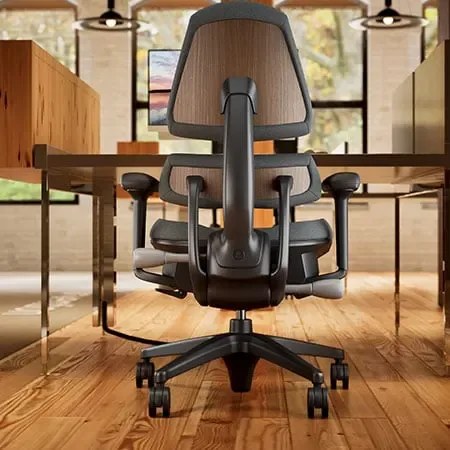
The Anthros is not a general-purpose ergonomic chair — and it is not trying to be. At approximately $1,950, it is a specialized piece of equipment designed for a specific outcome: exceptional lower back support for users who have found standard ergonomic chairs insufficient.
BTOD's reviewer is direct: "The Anthros chair is around $1,950 and it's a highly specialized chair, which is exactly why it's on this list." What makes it mechanically different from every other chair in this guide is its back adjustment system. BTOD describes it as having a separate lower and upper portion that adjust independently — delivering lumbar support that is "unlike any chair I've tested." This independent dual-zone system allows users to dial in support precisely for their individual lumbar curve rather than accepting a fixed pad that may or may not align with their anatomy.
BTOD positions it specifically for "serious back pain sufferers who've tried everything, or anyone who wants to stay ahead of back issues caused by long-hours sitting." For general ergonomic needs, the Aeron or Branch Pro offer substantially better value. But for users with diagnosed or chronic lower back conditions who have already worked through multiple ergonomic chairs without sufficient relief, the Anthros addresses a problem others cannot.
Best suited for: Users with chronic or significant lower back conditions, those who have already tried multiple ergonomic chairs without sufficient relief, and people in roles requiring extended seated hours with high physical demand on the lumbar spine.
Budget Picks: Real Ergonomics Under $350
Under $350, the honest answer is that trade-offs exist — but you can choose which trade-offs to make. BTOD is clear about what this price tier realistically delivers: real ergonomic adjustability, a solid base, and a build that holds up for years. What you give up compared to mid-range and premium options: better materials throughout (premium foam, digital knit fabrics, commercial-grade frames), more refined adjustments, and longer warranties.
Refurbished Steelcase Leap V2 (~$300): The Smart Value Play
BTOD identifies the refurbished Steelcase Leap V2 at around $300 as "the sweet spot" — a chair that gives "premium-tier features at the entry-level price." Buying refurbished from a reputable dealer is a legitimate strategy for accessing commercial-grade ergonomics at significantly reduced cost, provided the chair comes with a warranty on the refurbishment. Availability varies, but this is the single highest-value chair in the under-$400 range when you can find it.
Autonomous ErgoChair Pro (~$250): Best for Wide Seats and Headrest
Wired's tester used the Autonomous ErgoChair Pro for a month without major problems. It earns its place for users who specifically need a wider seat and a headrest included at the budget tier — features not available on the Branch Pro at a lower price. The trade-off: control levers are not intuitive, and the overall build refinement is noticeably below the Branch Pro. It is not the first choice over Branch, but it fills a specific fit need at an accessible price.
At any budget tier, these three specs are non-negotiable: seat height adjustment, adjustable lumbar support (over fixed), and armrests that do not force your shoulders upward. Everything else at this price is a bonus.
Frequently Asked Questions
How much should I spend on an ergonomic office chair for WFH?
It depends on two factors: how many hours you sit and whether you have existing back or posture concerns. For occasional use under four hours daily, a well-adjusted $200–$350 chair with proper lumbar and height adjustment is sufficient. For six or more hours daily, the investment in a mid-range chair like the Branch Ergonomic Chair Pro or a refurbished Steelcase Leap V2 consistently pays off in sustained comfort and long-term health. For chronic back pain or all-day seated work, premium options like the Herman Miller Aeron or the Anthros chair are worth the cost — treating them as a health investment rather than a furniture expense.
Is the Herman Miller Aeron worth the price in 2026?
For users who sit long hours, run warm, and want a chair that performs across all ergonomic dimensions without supplementary cushions, yes. The PostureFit SL lumbar system, Pellicle mesh breathability, and three-size fit system are genuine differentiators. For users who sit fewer than five hours daily or have a tight budget, the Branch Ergonomic Chair Pro delivers comparable adjustability at roughly one-third of the price and is the more rational buy.
What is the best office chair specifically for lower back pain?
According to BTOD, the Anthros chair is the strongest option for serious lower back pain, due to its independently adjustable upper and lower back zones. For users whose lower back pain is moderate rather than chronic, the Herman Miller Aeron's PostureFit SL system is the next-strongest option — and a better overall value at $1,395 versus $1,950.
Is a mesh chair or foam chair better for long hours?
Mesh chairs — like the Aeron and Branch Pro — dissipate heat better and are generally preferred for sessions over four hours, particularly in warm home environments. High-quality foam (as found in the Steelcase Gesture's seat) can match mesh in comfort for moderate sessions but accumulates heat faster during long ones. If you run warm or work in an environment without strong air conditioning, mesh is the safer choice.
Can I find a good ergonomic chair at IKEA or Wayfair?
IKEA's office chair lineup is primarily entry-level, and its ergonomic adjustability options are limited at most price points. If you're considering IKEA for your home office, our IKEA 2026 review breaks down where their furniture holds up and where it falls short. Wayfair carries a wider range including mid-range ergonomic options, though quality consistency varies significantly by brand — our Wayfair 2026 review covers what to look for and what to avoid when buying furniture through their platform.
Should I also consider a standing desk alongside my chair?
Standing desks and ergonomic chairs work in tandem rather than as substitutes. Alternating between sitting and standing throughout the day is more effective than optimizing only for seated posture. If you're building out a full ergonomic WFH setup, pairing a well-fitted chair with an adjustable desk is the most evidence-supported approach. Our 2026 furniture and appliances buyer's guide covers standing desk options alongside seating.
Building the Rest of Your Home Office
A great chair is the foundation, but your full WFH ergonomic setup extends to every surface you interact with. If you're furnishing or refurnishing your home office this year:
- For desk and storage options at every budget, see our furniture and appliances buyer's guide for 2026.
- If you're also looking at where to buy furniture online, our best home decor online stores guide for 2026 covers which retailers earn consistent marks for quality, shipping, and returns.
- For the rest of your workspace — TV stands, entertainment centers, and living-room furniture that pulls double duty in a home office — our best TV stands and entertainment centers guide for 2026 covers the top picks by room size and style.
Trusted Buyer Report may earn a commission when you click links or make purchases through our site, at no extra cost to you. Our editorial assessments are completed before any affiliate link is applied and are never influenced by commercial relationships. Full affiliate disclosure → | How we review →